
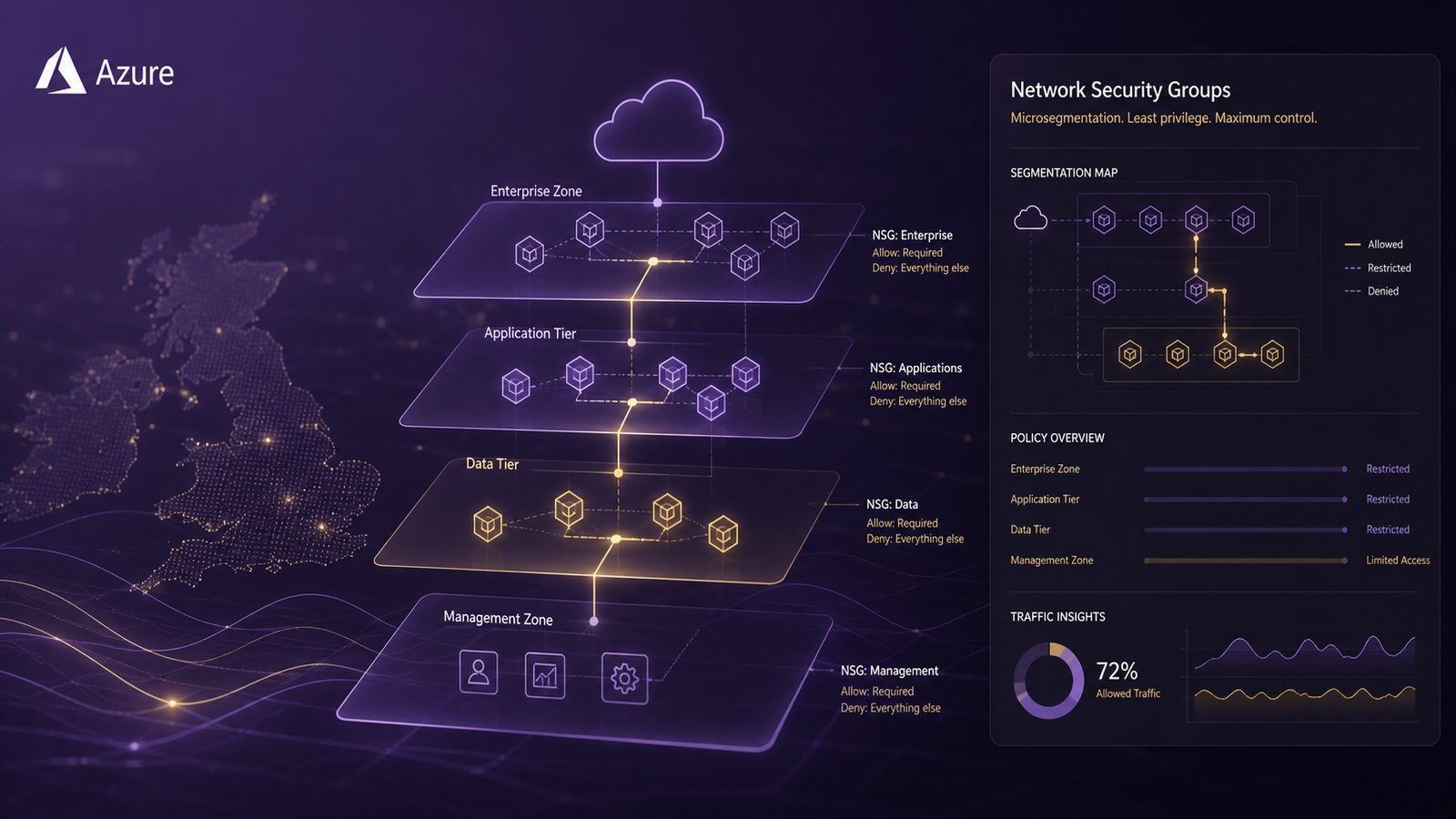
Microsegmentation is the practice of breaking a network into smaller trust zones so that workloads can only talk to the systems they genuinely need. In Azure, network security groups, usually shortened to NSGs, are one of the most practical controls for doing that at subnet or network interface level. They are not a complete security architecture on their own, but they are a useful building block when you want to reduce lateral movement, narrow inbound exposure, and make east-west traffic more deliberate.
For UK SMEs, the value is usually less about theoretical elegance and more about reducing the blast radius of a compromise. If one virtual machine, application tier, or management path is exposed, you want the rest of the environment to remain difficult to reach. That is the same design logic behind defence in depth and Zero Trust, and it aligns well with the broader principles discussed in our article on Zero Trust network access and microsegmentation design.
Key takeaways
- Model workloads, trust boundaries, and data flows before writing any Azure NSG rules.
- Use subnet-level NSGs for standard policy, then add NIC-level rules only where a tighter exception is justified.
- Combine NSGs with service tags, application security groups, and infrastructure as code to keep segmentation maintainable.
- Validate the effective policy with flow logs, activity logs, and safe connectivity testing after rollout.
- Treat segmentation as an operating model, not a one-time project, and review exceptions regularly.
What microsegmentation means in Azure
In Azure, an NSG is a stateful packet-filtering control that allows or denies traffic based on source, destination, protocol, port, and direction. Because it is stateful, return traffic for an allowed session is handled automatically. That makes NSGs suitable for enforcing simple, repeatable network policy between subnets, between tiers, and sometimes on individual NICs where you need tighter control.
Microsegmentation with NSGs is not the same as traditional perimeter segmentation. You are not just separating internal from external traffic. You are defining which internal paths are acceptable, such as web to application, application to database, or jump host to management ports. That is why NSGs fit naturally into a Zero Trust mindset, where trust is not granted simply because traffic is inside the virtual network.
NSGs also work well as part of defence in depth. They complement identity controls, host hardening, TLS, and logging. If an attacker gets a foothold, the NSG layer can prevent easy pivoting to adjacent systems. If you want a broader view of how this fits into layered design, the article on Secure-by-Design Principles for UK SMEs is a useful companion.
When NSGs are a good fit, and when they are not
NSGs are a good fit when you need deterministic network rules with low operational overhead. Common examples include restricting inbound RDP or SSH to a management subnet, allowing only web ports from a load balancer to an application tier, or limiting database access to a known application subnet. They are also useful for controlling east-west traffic inside a virtual network where the dependency graph is relatively stable.
They are less suitable when you need centralised inspection, advanced threat filtering, URL or application-layer policy, or consistent control across multiple networks and hybrid links. In those cases, Azure Firewall or a reverse proxy may be a better fit. Likewise, if the control point needs to understand the application itself rather than just the IP and port, then service-level controls, mutual TLS, or identity-aware access are usually more appropriate.
A practical rule is this: use NSGs for coarse-grained network enforcement, then add higher-layer controls where the risk justifies it. For example, if you are protecting a public-facing service, NSGs can restrict the source ranges and ports, but the application gateway, web application firewall, and TLS configuration still matter. For service-to-service protection, you may need more than network policy alone, especially where you want strong service identity. Our article on designing secure communications using TLS and mutual authentication covers that layer in more detail.
Designing the segmentation model before you configure anything
The biggest mistake teams make is opening Azure and writing rules before they have modelled the environment. Start with workloads, trust boundaries, and data flows. Identify the business services, the supporting components, and the administrative paths. Then decide which paths are required for normal operation, which are only needed during maintenance, and which should never exist.
A simple way to structure the work is to map each workload into a tier and a trust zone. For example, a web tier, an application tier, a data tier, and a management tier. Then define the allowed flows between them. This is where data-flow diagrams are useful, because they show direction, protocol, and dependency rather than just a list of assets. If you need a refresher on that method, see Applying data-flow diagrams to security threat modelling.
Once the flows are clear, map them to Azure constructs. Subnets are usually the first design boundary, because they are easy to reason about and easy to govern. NIC-level NSGs can then be used for exceptions or for particularly sensitive hosts. Also identify administrative paths early. If your support team needs to reach a jump host, or if automation needs to talk to a deployment agent, those paths should be explicit and documented, not discovered later through troubleshooting.
How to structure NSGs for practical microsegmentation
There are three design choices that matter most: where to attach the NSG, how to name and order the rules, and how to avoid rule sprawl.
Subnet-level NSGs are usually the default choice. They are easier to manage, easier to audit, and better for enforcing a standard policy across a tier. NIC-level NSGs are useful when a single machine needs a stricter policy than the rest of the subnet, but they can become difficult to maintain if overused. In most SME environments, a subnet-first model with a small number of NIC exceptions is the right balance.
Rule priority matters because Azure evaluates rules in order. Keep the most specific allow or deny rules above broader ones, and reserve the default lower-priority rules for fallback behaviour. Use a consistent naming scheme that tells you the source, destination, protocol, and purpose. For example, a rule name such as allow-web-to-app-tcp-443 is much easier to operate than a vague label like rule-12.
Directionality also matters. Inbound and outbound rules should be designed separately, even if they look symmetrical at first glance. A common pattern is to allow inbound web traffic to a front-end subnet, allow only application-to-database traffic on the required port, and deny everything else by default. That approach is consistent with the principle of least privilege and helps keep the policy understandable.
To reduce rule sprawl, use service tags and application security groups where possible. Service tags let you reference Azure-managed groups such as platform services without hard-coding IP ranges. Application security groups, or ASGs, let you group VMs by function rather than by address, which makes rules more readable and more resilient to IP changes. For example, you can allow traffic from an ASG representing web servers to another ASG representing application servers, instead of maintaining a long list of individual IP addresses.
Example segmentation patterns for common Azure workloads
A three-tier web application is the most common starting point. In that pattern, the public edge is handled by a load balancer or application gateway, the web tier receives only the traffic it needs, the application tier accepts requests only from the web tier, and the database tier accepts requests only from the application tier. Administrative access is routed through a separate management path, ideally via a jump host or privileged access workflow.
In Azure terms, that often means one NSG on the web subnet, one on the application subnet, and one on the data subnet. The web subnet may allow inbound 443 from the load balancer or gateway. The application subnet may allow inbound 443 or another application port only from the web subnet. The database subnet may allow inbound SQL or another database port only from the application subnet. Everything else is denied. This is simple, but it is often enough to stop opportunistic lateral movement.
Shared services need a little more care. DNS, monitoring agents, update services, and backup tooling often create hidden dependencies. If you do not model them, you will either break the environment or create broad exceptions. The safest approach is to document shared services as explicit consumers and producers in the data-flow model, then grant them only the ports and directions they require.
Management access should be treated as a separate trust zone. Do not mix administrative traffic with application traffic just because it is convenient. A management subnet can host jump boxes, patching tools, and remote administration endpoints, with NSGs allowing access only from approved source ranges or identity-aware gateways. That keeps privileged paths visible and easier to monitor.
Managing inbound access to web applications
NSGs can control inbound traffic to web applications, but only at the network layer. They are useful for limiting who can reach a service, which ports are open, and whether traffic can reach a subnet directly. They are not a substitute for application-layer controls such as authentication, authorisation, input validation, or web application firewall policy.
If a web app is exposed through a public endpoint, the NSG should usually allow only the minimum required inbound ports from the expected source. If the app sits behind a load balancer or reverse proxy, the NSG should allow traffic from that front-end component rather than from the internet at large. This is especially important when you want to keep the backend private while still serving public traffic safely.
For internal web applications, NSGs are often enough to keep the service reachable only from a corporate VPN, a private access path, or a management network. But if the application is sensitive, you should still consider whether identity-based controls and TLS client authentication are needed. Network restriction alone does not prove the caller is trusted.
NSG versus Azure Firewall: how to choose the right control
NSGs do one job well: they enforce network access rules close to the workload. They are lightweight, cheap to operate, and easy to apply at scale if your design is disciplined. For many SME environments, that is enough for the first phase of microsegmentation.
Azure Firewall adds central policy, logging, and broader control over north-south and some east-west traffic patterns. It is better when you need a single enforcement point, more detailed inspection, or consistent policy across multiple spoke networks. It also helps when you want to control outbound access more tightly, which NSGs can do only in a limited, rule-based way.
The choice is not either-or. A common pattern is to use NSGs for local segmentation and Azure Firewall for central egress control or shared inspection. That gives you layered enforcement without forcing every decision through one bottleneck. If you are thinking about bottlenecks and resilience as well as security, our article on identifying bottlenecks and single points of failure in security architecture is relevant here.
Infrastructure as code for repeatable NSG deployment
Microsegmentation becomes much easier to manage when it is defined as code. Terraform is a strong fit because it lets you version NSGs, rules, ASGs, and related Azure resources in a repeatable way. That reduces configuration drift and makes peer review possible before a rule reaches production.
A sensible pattern is to define one module per workload tier or per application, with variables for source ASGs, destination ASGs, ports, and environment-specific values. Keep the rule set declarative and avoid hard-coding IP addresses where a service tag or ASG will do. Use separate workspaces or environments for development, test, and production so that you can validate the policy before rollout.
Change control matters as much as the code itself. Treat NSG changes like any other security-relevant infrastructure change. Review them in pull requests, require a second pair of eyes for production, and record the business reason for each exception. If a rule is temporary, set an expiry date and track its removal. That discipline is often what prevents a tidy design from decaying into a long list of exceptions.
Operational risks to watch for
The first risk is over-permissive rules. Teams often add a broad allow rule to fix a service outage, then leave it in place because nobody wants to break the system again. Over time, those exceptions become the real policy. To avoid that, keep emergency changes visible, time-bound, and reviewed after the incident has passed.
The second risk is shadowed rules. Because Azure evaluates rules by priority, a broad rule can silently override a more specific one if the order is wrong. This is one reason to keep rule naming and numbering consistent, and to test the effective policy after each change.
The third risk is undocumented dependencies. A workload may rely on DNS, certificate revocation checks, monitoring, or a third-party API that was never captured in the original design. If you block it without understanding the dependency, the service may fail in a way that looks like an application bug. Good segmentation design therefore includes dependency discovery, not just security intent.
The fourth risk is break-glass access. Every environment needs a way to recover when normal access paths fail, but break-glass should be tightly controlled, logged, and reviewed. It should not become a standing exception for convenience.
Monitoring and validation after rollout
Once the NSGs are in place, validate the design rather than assuming it works. Azure network watcher flow logs can help you see which flows are actually occurring, and activity logs can show who changed what and when. Feed those logs into your SIEM so that unexpected connections, denied traffic spikes, or rule changes can be correlated with other events.
Validation should include safe connectivity checks. Test the expected paths, confirm that denied paths are actually blocked, and verify that administrative access works only from the approved management route. Keep the tests simple and repeatable. The goal is to prove the policy, not to stress the environment.
It is also worth comparing observed traffic to the original data-flow model. If a service is talking to something you did not expect, either the model is incomplete or the environment has drifted. In both cases, you have useful information. That is one reason segmentation should be treated as an operating model, not a one-off project.
Common design mistakes to avoid
The most common mistake is using one large NSG for everything. It feels simpler at first, but it quickly becomes hard to understand, hard to test, and hard to change safely. Smaller, workload-aligned NSGs are usually easier to operate and less likely to create accidental coupling.
Another mistake is confusing segmentation with security by obscurity. If the application is still exposed broadly, if identity controls are weak, or if the backend trusts any internal source, the NSG layer will not save you. Segmentation works best when it supports stronger authentication, better logging, and tighter administrative control.
A third mistake is treating segmentation as finished once the rules are deployed. Networks change, applications evolve, and cloud environments are especially dynamic. Build a review cycle into your change process so that NSGs are checked against current architecture, not just the original design.
A pragmatic rollout approach for UK SMEs
For most UK SMEs, the best approach is incremental. Start with the highest-value assets and the most exposed services. That usually means internet-facing applications, management interfaces, and data stores containing sensitive information. These are the places where a small amount of segmentation can have a disproportionate risk reduction effect.
Then expand outward as dependencies become clearer. Add ASGs where they reduce maintenance overhead. Introduce Azure Firewall where you need central egress control or deeper inspection. Tighten administrative paths once you have confirmed that support and automation still work. The aim is not to build the most complex design possible, but the most maintainable one that meaningfully reduces risk.
If you want a broader architecture view before making changes, it can help to align the work with business objectives and operational constraints. Our article on aligning security architecture to business objectives is a useful reference point for that conversation.
Designing microsegmentation with Azure network security groups is ultimately about clarity. Know what must talk to what, express that in code, monitor the result, and keep the policy under review. Done well, it gives you a practical layer of containment without making the environment unmanageable.
If you would like help reviewing an Azure segmentation design, or want a second opinion on how NSGs, Azure Firewall, and identity controls should fit together, Speak to a consultant.
Frequently asked questions
Can Azure network security groups be used for microsegmentation?
Yes. NSGs are a practical way to implement microsegmentation in Azure at subnet or NIC level, especially when you want to control east-west traffic between tiers and reduce lateral movement. They work best when designed from workload dependencies rather than added ad hoc.
Do NSGs replace Azure Firewall for segmentation?
No. NSGs are good for local, workload-close network enforcement, but Azure Firewall is better when you need central policy, deeper inspection, or broader control across networks. Many environments use both, with NSGs handling local segmentation and Azure Firewall handling shared inspection or egress control.
Comments are closed