
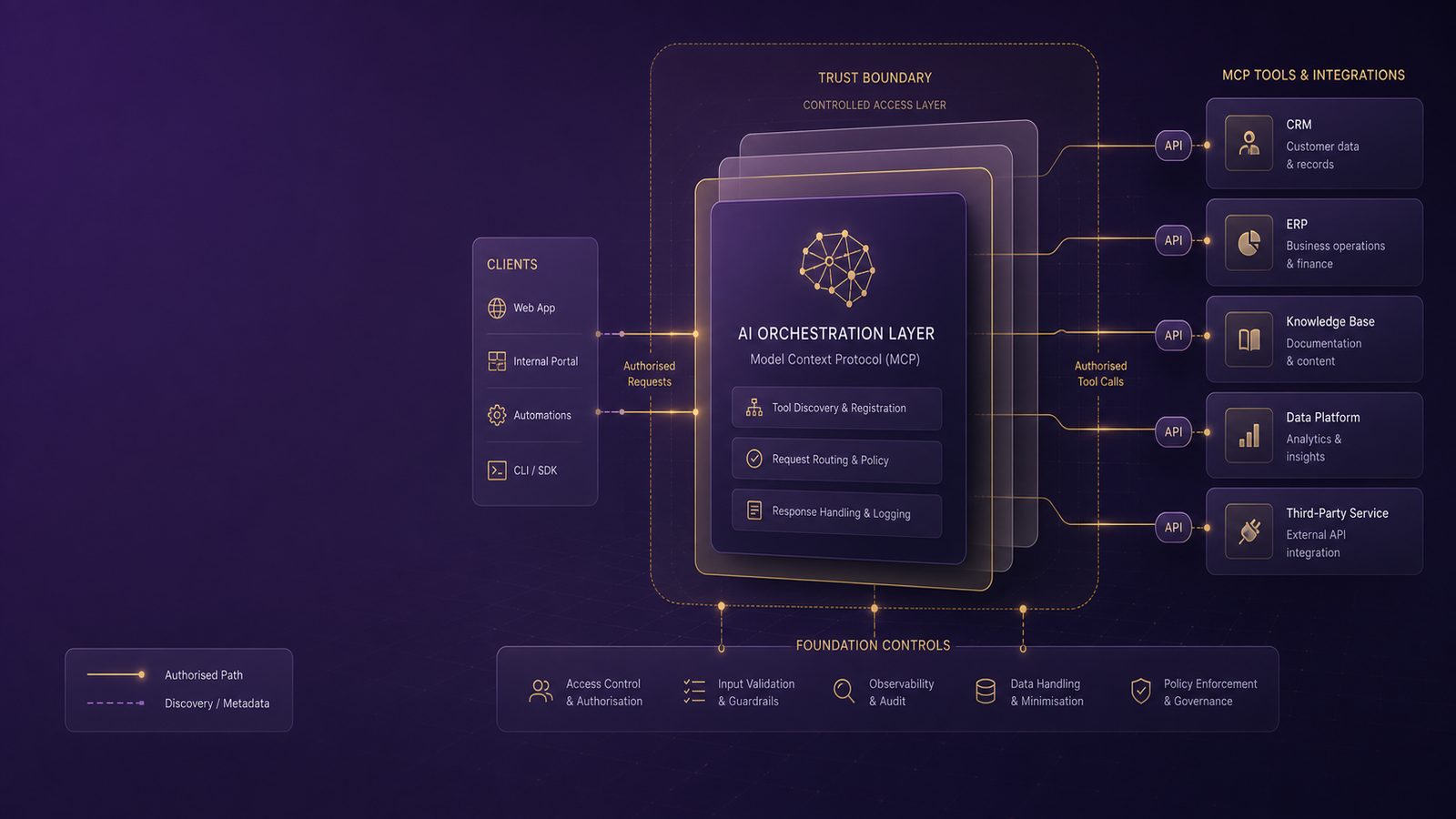
Model Context Protocol, or MCP, is becoming a practical way to connect large language models to internal tools, data sources, and workflows. For security teams, that changes the control problem. A chat-only assistant can still leak information or be manipulated, but an MCP-enabled assistant can also trigger actions in business systems, query sensitive data, and chain together multiple tools. That makes the security boundary much more important.
For UK SMEs, the main issue is not whether MCP is inherently unsafe. The issue is that it expands the blast radius of a model interaction. If the model can call a ticketing system, a file store, a CRM, or an internal API, then prompt injection, weak authorisation, or poor logging can turn a simple conversation into an operational security event. The right response is not to avoid AI altogether, but to design MCP integrations with the same discipline you would apply to any other privileged service integration.
Key takeaways
- Treat MCP as a privileged integration layer, not just another chatbot feature, because it can trigger real actions in business systems.
- Start with least privilege, short-lived credentials, and per-tool authorisation so the model cannot exceed the intended scope.
- Validate inputs, sanitise outputs, and keep sensitive actions behind approval gates to reduce the impact of prompt injection and tool abuse.
- Log tool calls, policy decisions, and approvals with correlation IDs so unusual behaviour can be investigated quickly.
- Begin with low-risk read-only use cases if your identity, monitoring, or change control processes are not yet mature.
What MCP is and why tool integrations change the risk profile
How MCP sits between models, tools, and data sources
MCP is a standardised way for an AI host application to expose tools and resources to a model. In practice, the host sits between the model and the external systems. The model decides what it wants to do, the host enforces policy, and the MCP server or tool endpoint performs the action. That architecture is useful because it separates the model from direct system access, but it also creates a new trust chain that needs to be controlled end to end.
In a typical deployment, the model may receive user prompts, retrieved context, tool descriptions, and tool outputs. Each of those inputs can influence subsequent actions. If the host application forwards too much context, or if the MCP server trusts the model too much, the integration can become a high-value pivot point. This is especially relevant where the tool has write access, can retrieve regulated data, or can trigger downstream automation.
Why tool access creates a different control problem from chat-only AI
Chat-only AI security is mostly about prompt handling, content filtering, and data leakage. MCP adds identity, authorisation, transaction safety, and auditability. A model that can only answer questions is one thing. A model that can create invoices, reset passwords, approve access, or export records is something else entirely. That is why the security model needs to move from content moderation to controlled execution.
This is closely related to the broader concerns covered in preventing prompt injection and model abuse, but MCP requires an additional layer of control because the model is no longer just generating text. It is influencing actions in connected systems.
Core threat model for MCP environments
Prompt injection, tool abuse, and indirect instruction attacks
The most obvious risk is prompt injection. An attacker can place malicious instructions in user input, retrieved documents, web content, or tool output, then rely on the model to follow those instructions instead of the host policy. In an MCP environment, the impact is greater because the model may use those instructions to select a tool, pass parameters, or request data it should not have seen.
Indirect instruction attacks are particularly important in retrieval-augmented workflows. If the model reads a document that contains hidden or misleading instructions, it may treat that content as operational guidance. The host therefore needs to distinguish between untrusted content and trusted policy. Tool descriptions, system prompts, and policy rules should be treated as higher trust than retrieved data, and the model should never be allowed to override them.
Tool abuse can also happen without sophisticated injection. If the model is given a broad tool catalogue, it may choose the wrong tool, call the right tool with unsafe parameters, or chain tools in a way the business did not intend. That is why tool exposure should be curated rather than comprehensive.
Over-privileged connectors, token theft, and lateral movement risk
The second major risk is over-privilege. Many early AI integrations are built with service accounts that have far more access than the use case requires. If an attacker can influence the model, or if a tool endpoint is compromised, those credentials can be used to reach data or systems beyond the intended scope. This is a familiar identity and access management problem, but MCP makes it easier to hide because the access is mediated by the model.
Token theft is another concern. If bearer tokens, API keys, or refresh tokens are stored insecurely in the host, logs, or environment variables, they may be exposed through debugging, misconfiguration, or compromise of the application runtime. Once a token is stolen, the attacker may not need the model at all. They can interact with the underlying systems directly.
There is also a lateral movement angle. A compromised MCP server that can reach internal APIs, cloud services, or administrative consoles may become a bridge into other parts of the environment. That is why the integration should be treated as a privileged service, not as a convenience layer.
Design principles for safer MCP deployments
Least privilege for tools, scopes, and data access
Least privilege should be the default design principle. Each tool should have a narrow purpose, a narrow data scope, and a narrow action scope. If a tool only needs to read a single project workspace, do not give it tenant-wide access. If it only needs to create draft tickets, do not let it close incidents or change priority without a separate approval path.
In cloud environments, this usually means using dedicated service principals or workload identities with tightly scoped permissions. In API terms, prefer short-lived delegated access over long-lived static secrets. In application terms, split read and write functions into separate tools where possible. That makes policy enforcement simpler and reduces the chance that a single compromised integration can do everything.
This same discipline is consistent with broader secure configuration and environment isolation practices, as discussed in secure configuration management and environment isolation. MCP should not be deployed into a flat trust zone where every tool can reach every system.
Strong trust boundaries between the model, host application, and external systems
The model should not be treated as a trusted decision-maker. It is a policy consumer, not a policy authority. The host application should enforce the rules for which tools are available, which parameters are acceptable, and which actions require human approval. The MCP server should validate requests independently rather than assuming the host has already done so correctly.
A useful pattern is to think in terms of three layers. The model proposes. The host authorises. The tool executes. If any layer is bypassed, the design is too weak. This separation also helps with testing, because you can validate each boundary independently.
Identity, authentication, and authorisation controls
Service-to-service authentication and short-lived credentials
MCP integrations should use service-to-service authentication rather than shared user credentials. Mutual TLS, signed tokens, or workload identity federation are all preferable to static API keys stored in configuration files. The key objective is to make each request attributable and revocable.
Short-lived credentials reduce the value of token theft. If a token is valid only for a short window and only for a specific audience, the attacker has less time and less flexibility. Where possible, bind credentials to the host instance, environment, or workload identity. Avoid reusing the same secret across development, test, and production.
For sensitive integrations, use a pattern similar to the one described in designing secure communications using TLS and mutual authentication. The exact mechanism will vary, but the principle is the same: authenticate both ends, protect the channel, and assume the network is not trustworthy.
Per-tool authorisation, tenant separation, and approval gates for sensitive actions
Authorisation should be per tool and, where practical, per action. A tool that reads customer records should not automatically be able to update them. A tool that can create a support case should not be able to delete one. If the same endpoint supports multiple actions, enforce action-level checks in the tool itself, not only in the host.
Tenant separation matters when the same MCP service is used for multiple business units or customers. The integration should carry tenant context explicitly and verify it on every request. Do not rely on the model to keep tenants separate. That is a policy failure waiting to happen.
For high-impact actions, add an approval gate. Examples include sending external emails, changing access rights, exporting large datasets, or making financial changes. The model can prepare the request, but a human or a separate policy engine should confirm it before execution. This is a practical control, not a sign of lack of trust in AI. It is simply the right safeguard for irreversible actions.
Hardening MCP servers and tool endpoints
Input validation, output handling, and command safety
MCP servers should validate every input as if it came from an untrusted client, because it does. The model may generate malformed, unexpected, or adversarial parameters. Validate types, lengths, formats, enumerations, and allowed values. Reject anything that does not match the contract.
Where tools invoke shell commands, scripts, SQL queries, or other interpreters, avoid string concatenation and use parameterised interfaces. Better still, design tools so they call fixed functions rather than arbitrary commands. If a tool must execute a command, restrict it to an allow-list of safe operations and run it under a low-privilege account.
Output handling matters too. Tool responses may contain secrets, personal data, or instructions that should not be passed back into the model in full. Sanitize outputs before they are reintroduced into the context window. If a tool returns a large document, consider summarising or redacting it before the model sees it. This is a direct extension of the secure coding principles covered in input validation, encoding, and output sanitisation techniques.
Network exposure, secrets handling, and secure configuration baselines
MCP servers should not be broadly exposed to the internet unless there is a strong reason. Prefer private network placement, reverse proxies, and explicit allow-lists. If remote access is required, protect it with strong authentication, rate limiting, and request logging. The server should only be reachable from the host applications that actually need it.
Secrets should be stored in a managed secrets service or equivalent secure store, not in source code, container images, or ad hoc configuration files. Rotate secrets regularly and on suspicion of compromise. Ensure logs, crash dumps, and telemetry do not capture secrets by default.
Use a secure baseline for the host, the MCP server, and any supporting runtime. That includes patching, minimal packages, restricted outbound connectivity, and hardened container or VM settings where relevant. The integration should be deployed with the same care you would apply to any internet-facing or privileged internal service.
Controlling data flow and preventing sensitive leakage
Data classification for prompts, context, and tool outputs
One of the easiest mistakes in AI deployments is treating all context as equally safe to share. In reality, prompts, retrieved documents, tool outputs, and conversation history may contain different classes of data. Classify them accordingly. A user prompt may be low sensitivity, while a tool output may contain customer records, credentials, or internal operational details.
Once you understand the data classes, define what the model is allowed to see. Not every tool output needs to be passed back into the model. Not every user needs access to every tool. Not every workflow needs persistent conversation memory. The less sensitive data the model sees, the less can be leaked or manipulated.
This is especially important where the MCP integration touches regulated or commercially sensitive data. If the business already has data handling rules, extend them to AI context. The model should not become a side channel that bypasses existing controls.
Minimising what the model can see, store, or forward
Minimisation is one of the most effective controls available. Pass only the fields needed for the task. Truncate long histories. Remove secrets, tokens, and identifiers before context assembly. Avoid sending raw documents when a structured summary will do. If the model does not need the full payload, do not give it the full payload.
Be careful with memory features and conversation persistence. If the host stores prior interactions for convenience, that store becomes part of the attack surface. Define retention periods, access controls, and deletion processes. For some use cases, stateless operation is safer and easier to govern.
Where the integration is part of a broader AI estate, it can help to align the design with the same governance approach used for other third-party AI services. The article on managing third-party model risk and AI dependencies is relevant here because MCP often increases dependency on external model behaviour and tool providers at the same time.
Logging, monitoring, and detection engineering
What to log across MCP requests, tool calls, and policy decisions
Good logging is essential because MCP failures are often subtle. At a minimum, log the requestor identity, session identifier, tool name, action type, decision outcome, policy reason, and a correlation ID that ties the model interaction to the downstream system action. If a tool call is denied, log the denial reason. If a sensitive action is approved, log who approved it and when.
Do not log secrets or full sensitive payloads unless there is a clear operational need and a defined retention policy. Instead, log metadata, hashes, or redacted summaries. The goal is to make the event reconstructable without creating a second data exposure problem.
For teams already using a SIEM, MCP events should be ingested alongside identity, endpoint, and application logs. That makes it easier to correlate unusual tool use with suspicious sign-ins, impossible travel, or anomalous API activity. If you already have a logging strategy, extend it rather than creating a parallel AI-only silo.
Detection ideas for unusual tool use, privilege escalation, and exfiltration patterns
Useful detections include repeated denied tool calls, sudden use of a tool outside normal business hours, a spike in high-risk actions, and requests that touch unusually large data volumes. Watch for model sessions that rapidly switch between tools in a way that does not match normal workflows. That can indicate chaining, misuse, or automated probing.
Also look for signs of privilege escalation. For example, a low-risk assistant should not suddenly start calling administrative endpoints, exporting bulk records, or requesting broader scopes. Alert on changes in tool inventory, permission grants, and secret rotation failures. These are often the earliest indicators that an integration has drifted from its intended security posture.
Where possible, map detections to MITRE ATT&CK techniques at a conceptual level, especially around credential access, lateral movement, and exfiltration. That helps security teams reason about the likely impact if the integration is abused.
Testing and assurance before production rollout
Abuse case testing for tool misuse and unsafe chaining
Before production rollout, test the integration with abuse cases rather than only happy-path scenarios. Try malformed tool inputs, unexpected data types, repeated requests, and attempts to coerce the model into calling tools it should not use. Test whether the host blocks unsafe parameters, whether the tool rejects invalid requests, and whether the logs show the right evidence.
Also test chaining. A common failure mode is that one tool output becomes the next tool input without enough scrutiny. If a tool returns a URL, file path, or identifier, check whether the model can use it to reach something outside the intended scope. The objective is to prove that the host enforces boundaries even when the model behaves unpredictably.
For teams that already run structured security testing, this fits naturally into existing review processes. It is similar in spirit to the approach described in secure design reviews and architecture checkpoints in the SDLC, except the focus is now on model-mediated execution paths.
Mapping MCP controls to OWASP LLM guidance and existing security review processes
It is sensible to map MCP controls to the OWASP Top 10 for LLM Applications, particularly areas such as prompt injection, insecure output handling, and excessive agency. The value of the framework is not the label itself, but the discipline of checking whether the integration has clear trust boundaries, safe tool use, and adequate monitoring.
Do not create a separate AI security process that duplicates everything else. Instead, extend your existing secure development lifecycle, access review, logging, and incident response processes. MCP is a new pattern, but it still depends on familiar controls: identity, authorisation, change management, and detection.
Operational governance for SMEs using MCP
Change control, ownership, and exception handling
Every MCP integration should have a named owner. That owner is responsible for the tool inventory, access scopes, change control, and operational review. If nobody owns the integration, it will drift. Drift is one of the most common causes of security weakness in fast-moving AI projects.
Changes to tools, scopes, prompts, and approval rules should go through normal change control. If the business needs an exception, record it with an expiry date and a compensating control. For example, if a team needs temporary access to a broader dataset, require a time-limited approval and review the access afterwards.
Document the intended use cases and the prohibited ones. An MCP assistant that helps with internal knowledge retrieval should not quietly become a general-purpose automation engine. Clear boundaries reduce both security risk and operational confusion.
When to restrict MCP to low-risk use cases until controls mature
Not every organisation is ready for full MCP automation on day one. If the team cannot yet log tool use properly, enforce per-tool authorisation, or rotate credentials safely, start with low-risk read-only use cases. That might include internal knowledge search, summarisation, or draft generation where no external action is taken.
As the control set matures, expand gradually into higher-impact workflows. This staged approach is often the most practical for UK SMEs because it allows the business to learn without exposing core systems too early. It also gives the security team time to tune detections and refine approval paths.
Practical checklist for securing MCP integrations
Use this as a minimum starting point for an initial deployment:
- Limit each tool to a single business purpose and the smallest practical permission set.
- Use short-lived service credentials and avoid shared static API keys.
- Separate read, write, and administrative actions into different tools where possible.
- Validate all inputs at the MCP server and reject unexpected parameter values.
- Sanitise tool outputs before they are passed back into the model context.
- Log tool requests, policy decisions, approvals, and denials with correlation IDs.
- Keep sensitive actions behind an approval gate or separate policy engine.
- Restrict network exposure and place the MCP server in a controlled trust zone.
- Test abuse cases, chaining, and privilege escalation before production use.
- Review scopes, owners, and exceptions on a regular schedule.
For many SMEs, the most important first step is not a complex technical control. It is deciding which tools the model should never be allowed to call automatically. That decision forces the rest of the architecture to become clearer.
If you are planning an MCP deployment and want a risk-based review of the architecture, access model, and operating controls, speak to a consultant.
Frequently asked questions
What are the main security risks of MCP tool integrations?
The main risks are prompt injection, indirect instruction attacks, over-privileged tool access, token theft, unsafe tool chaining, and weak logging. Because MCP can connect a model to real systems, the impact is broader than chat-only AI.
How do you reduce the chance of prompt injection leading to unsafe tool use?
Keep the model on a short leash: minimise the context it sees, separate trusted policy from untrusted content, validate every tool request on the host and server side, and require approval for sensitive actions. The model should propose, but policy should decide.
Comments are closed