
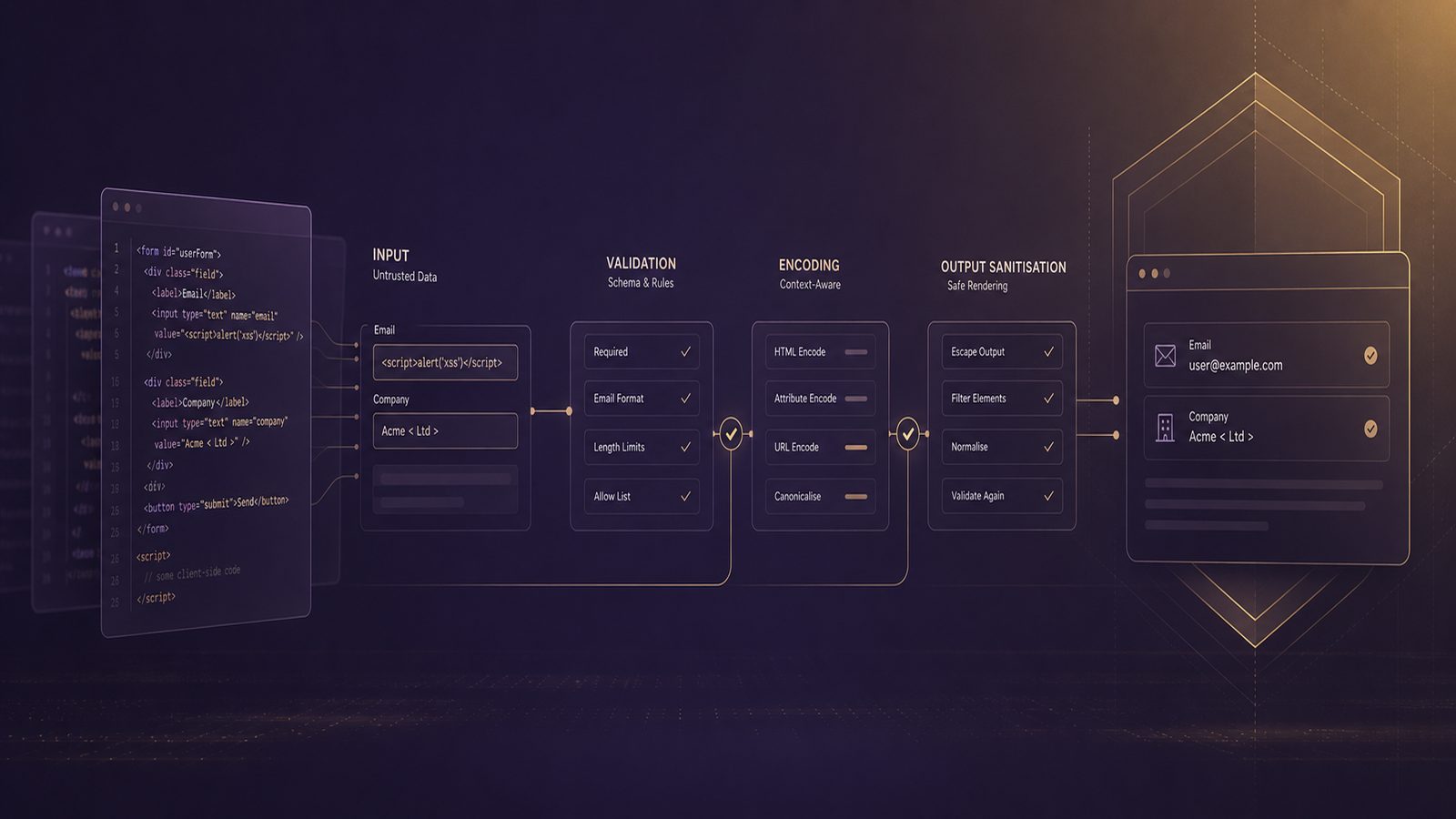
Input validation, encoding, and output sanitisation techniques for secure software development
Input validation, encoding, and output sanitisation are often mentioned together, but they solve different problems. Treating them as interchangeable is one of the most common causes of avoidable application security defects. For technical teams, the practical goal is not to add a generic filter at the edge and hope for the best. It is to apply the right control at the right point in the data flow, based on the context in which data is received, stored, transformed, and rendered.
For UK SMEs building web applications, APIs, internal tools, or customer portals, these controls are a core part of secure software development. They reduce the likelihood that untrusted data can alter application behaviour, reach a dangerous interpreter, or be rendered in a way that executes in a browser or other downstream component. They also make security easier to test, because the expected behaviour becomes explicit and repeatable.
Why these controls matter in modern application security
How validation, encoding, and sanitisation differ in the request and response flow
Input validation checks whether data is acceptable for a given field, operation, or workflow. It answers the question: should we accept this value at all? Good validation is usually strict, allow-list based, and tied to business rules. For example, a country code field should accept a known set of values, not any free-form string.
Encoding changes data so it is safe to place into a specific output context. It answers the question: how do we render this value without it being interpreted as code? HTML encoding, JavaScript string encoding, URL encoding, and CSS encoding are all different because the target interprets characters differently.
Output sanitisation removes or neutralises unsafe content while preserving some user-controlled formatting. It answers the question: how do we allow rich text or markup without permitting active content? Sanitisation is only appropriate when the application genuinely needs to accept limited formatting, such as comments, knowledge base articles, or markdown previews.
A useful mental model is this: validate on the way in, encode on the way out, sanitise only when you must preserve some structure. In practice, all three may be needed in the same application, but for different reasons.
Where these controls sit in a secure SDLC and OWASP ASVS-aligned design
In a secure software development lifecycle, these controls should be defined during design, implemented in code, and verified in testing. They are not just a developer preference. They are part of the application security baseline. If your team uses OWASP ASVS as a reference point, these controls map naturally to requirements around input handling, output encoding, and injection resistance. The value of ASVS is that it gives engineering teams a shared language for what “good” looks like across tiers, rather than relying on vague advice such as “sanitize inputs”.
For SMEs, the main benefit is consistency. If every service, controller, and template follows the same rules, the attack surface becomes easier to reason about and easier to review during change. That matters whether you are shipping a customer-facing SaaS platform or a smaller internal line-of-business application.
Threats these controls are intended to reduce
Injection paths across SQL, command, template, and LDAP contexts
Untrusted input becomes dangerous when it reaches a parser or interpreter that treats characters as instructions. The most familiar example is SQL injection, where user-controlled data alters a database query. The same pattern appears in command injection, template injection, LDAP injection, and similar issues. The technical detail varies, but the defensive principle is the same: do not concatenate untrusted data into a command, query, or template when the receiving component can interpret it as syntax.
Validation helps by rejecting values that do not belong in a field. Parameterised queries and safe APIs remain the primary defence for database access, but validation still matters because it reduces malformed data, simplifies business logic, and blocks obvious abuse before it reaches deeper layers. For command execution, the safest pattern is to avoid shell invocation entirely where possible and use APIs that pass arguments as structured values rather than a single command string.
Template engines deserve special attention. Teams sometimes assume that because a template engine is not a shell or database, it is inherently safe. That is not always true. If the application allows user-controlled fragments to influence template syntax, the result can be code execution or data exposure. The same caution applies to LDAP filters and other structured query languages.
How unsafe output handling turns low-severity bugs into exploitable issues
Many issues become exploitable only when output is handled incorrectly. A value that is harmless in storage can become dangerous when rendered into HTML, inserted into a JavaScript block, or placed into an attribute without the correct encoding. This is why output encoding is not optional. It is the control that prevents data from being interpreted as executable content in the browser or another consumer.
Cross-site scripting is the best-known example, but the broader lesson is more important. If your application reflects, stores, or reuses user-controlled content, every output context needs a deliberate encoding decision. A field that is safe in a text node may be unsafe in an attribute. A value that is safe in a URL parameter may be unsafe inside inline script. Context confusion is a common source of defects in otherwise mature codebases.
Designing input validation that is strict but usable
Allow-list validation, canonicalisation, and type enforcement
Strong validation starts with allow-lists. Define what is acceptable, not what is forbidden. This is more reliable because deny-lists are easy to bypass with alternate encodings, Unicode variants, or unexpected syntax. For example, if a field should only accept a small set of statuses, use an enumeration. If a field should contain a date, parse it as a date and reject anything that does not conform to the expected format.
Canonicalisation is also important. Before validating, normalise the input into a consistent form so that equivalent representations are treated the same way. This matters for Unicode, path handling, and encoded characters. Without canonicalisation, a value may appear safe in one representation and unsafe in another. The practical rule is to normalise once, validate once, and then use the validated representation consistently.
Type enforcement is one of the simplest and most effective controls. If a field is numeric, parse it as numeric data rather than accepting a string and checking it later. If a field is a UUID, use a UUID parser. If a file upload is expected to be an image, validate the file type using server-side inspection, not just the extension supplied by the client.
Validation should also reflect business logic. A postcode field may allow a broad range of valid UK formats, but a discount code field may need a much tighter pattern. The more closely validation matches the actual use case, the less room there is for abuse and the fewer false positives your users will experience.
Validation patterns for APIs, forms, file uploads, and JSON payloads
For APIs, schema-first validation is usually the cleanest approach. OpenAPI, JSON Schema, or equivalent contract definitions can express required fields, data types, length limits, enumerations, and format constraints. Enforce these at the service boundary and fail closed when the payload does not match the contract. This makes the API easier to consume and easier to test.
For HTML forms, server-side validation must always back up client-side checks. Client-side validation improves usability, but it is not a security control because it can be bypassed. Keep client-side checks for user experience, then repeat the same rules on the server. If the form accepts free text, apply length limits and character set constraints where appropriate, but avoid over-restricting legitimate names, addresses, or organisation details.
For file uploads, validate more than the extension. Check size, MIME type, magic bytes where appropriate, and storage location. If the file is meant to be processed later, consider whether it should be quarantined or scanned before use. Also ensure that uploaded files cannot be executed by the web server or interpreted by downstream tools in an unsafe way.
For JSON payloads, reject unknown fields where possible. This prevents silent acceptance of data that the application does not understand and reduces the risk of mass assignment style issues. It also helps keep contracts stable between services. If your application accepts nested objects, validate each layer explicitly rather than assuming that top-level checks are sufficient.
Encoding output correctly for the target context
Context-aware encoding for HTML, attributes, JavaScript, URLs, and CSS
Encoding must match the output context. HTML text nodes need HTML entity encoding. Attribute values need attribute-safe encoding, with care taken around quotes and event handler attributes. JavaScript contexts need JavaScript string or data encoding, not HTML encoding. URLs need URL encoding for parameter values, and CSS contexts require CSS-specific escaping. Using the wrong encoder is a common mistake and can leave dangerous characters intact.
The safest pattern is to avoid inline script and inline style where possible. If data does not need to be interpreted as code, keep it in text or structured data and let the browser or client code handle it safely. Content Security Policy can provide an additional layer, but it does not replace correct encoding.
When rendering data into templates, use framework helpers that are designed for the target context. Most modern frameworks provide automatic escaping for standard HTML output, but that protection can be lost if developers disable escaping, mark content as safe, or build HTML strings manually. Review any use of raw output functions, custom helpers, or template filters that bypass default escaping.
Common implementation mistakes in frameworks and templating engines
One common mistake is assuming that a framework’s default escaping covers every case. It usually does not. Default escaping is often suitable for HTML text nodes, but not for JavaScript, CSS, or URL contexts. Another mistake is double encoding, which can break legitimate content and encourage developers to disable protections to “fix” display issues.
Manual string concatenation is another recurring problem. If a developer builds HTML or JSON by joining strings, it becomes easy to miss a context boundary. Prefer structured serializers, template engines, and framework renderers that understand the output format. For JSON responses, use a proper serializer rather than hand-crafted strings, and set the correct content type so the browser or client interprets the response correctly.
Be careful with libraries that promise to “sanitize” output but actually only escape a narrow set of characters. Read the documentation for the exact context they support. A helper that is safe for HTML text may not be safe for attributes or script blocks. Security reviews should focus on the actual sink, not just the presence of a helper function.
Applying output sanitisation where rich text is required
When sanitisation is appropriate instead of encoding alone
Sanitisation is appropriate when the application must accept user-generated content that includes limited markup, such as bold text, links, or headings. In these cases, encoding everything would remove the intended formatting, so the application needs a controlled way to preserve some structure while stripping active content.
Use sanitisation sparingly and only at the point where rich content is accepted or rendered. The allow-list should be explicit about which tags, attributes, and protocols are permitted. For example, if links are allowed, the application should still reject dangerous protocols and strip event handlers, scriptable attributes, and embedded active content. Sanitisation should be deterministic and testable, not based on ad hoc string replacement.
It is also wise to separate trusted and untrusted content paths. Content created by administrators or internal editors may still need sanitisation, but the policy can differ from public user input. Keep the rules documented so that product and engineering teams understand which fields allow formatting and which fields must remain plain text.
Safe handling of user-generated content, markdown, and HTML fragments
Markdown is not automatically safe. Some markdown renderers allow raw HTML, embedded links, or extensions that can introduce risk. If you accept markdown, configure the renderer to disable raw HTML unless there is a strong reason not to, then sanitise the rendered output before it reaches the browser. The same applies to HTML fragments pasted from external sources.
For user-generated content, a safer pattern is often to store the original input, render it through a controlled pipeline, and sanitise the final HTML output before display. This makes it easier to reprocess content if the sanitisation policy changes. It also supports auditability, because you can distinguish between the source data and the rendered result.
Implementation patterns by stack
Practical approaches in server-side code, client-side rendering, and API gateways
On the server side, centralise validation in request handlers, model binders, or schema validators rather than scattering checks throughout business logic. This reduces duplication and makes the rules easier to review. In strongly typed languages, use domain types for constrained values, such as email addresses, identifiers, or bounded strings, so invalid data cannot flow far into the application.
In client-side rendering frameworks, treat any data from APIs, local storage, query strings, or third-party components as untrusted. Even if the data originated from your own backend, it may have been influenced by a user or external system. Use the framework’s safe binding mechanisms and avoid direct HTML insertion unless the content has been sanitised first.
API gateways and reverse proxies can help with coarse validation, such as request size limits, content type enforcement, and schema checks. They are useful for reducing noise and blocking obviously malformed traffic, but they should not be the only line of defence. Application-level validation remains necessary because only the application understands the full business context.
Using framework features and libraries rather than custom security logic
Custom security logic is expensive to maintain and easy to get wrong. Prefer framework-native validators, serializers, encoders, and sanitisation libraries that are well understood and actively maintained. This reduces the chance of subtle bugs and makes it easier for new developers to follow the same pattern.
Examples of good practice include using parameterised database access, built-in template escaping, established HTML sanitisation libraries, and schema validation middleware. Where possible, wrap these in shared application components so teams do not have to reimplement the same logic in every service.
For SMEs with multiple products or services, a shared validation and encoding approach can become a reusable platform capability. That does not mean one library fits every case, but it does mean the organisation can standardise on approved patterns, approved libraries, and approved review criteria.
Testing and verification techniques
Unit, integration, and security test cases for validation and encoding rules
Testing should prove both acceptance and rejection behaviour. For validation, create test cases for valid inputs, boundary values, malformed values, overlong values, unexpected encodings, and Unicode edge cases. For encoding, verify that the rendered output contains the expected escaped characters in each context. For sanitisation, test that allowed formatting survives and disallowed content is removed or neutralised.
Unit tests are useful for field-level rules and helper functions. Integration tests should exercise the full request-to-response path, because many encoding defects only appear when data crosses layers. Security-focused regression tests are especially valuable after template changes, framework upgrades, or new content features.
It is also worth testing negative cases that reflect real application behaviour. For example, if a field is used in a URL, test how it behaves with reserved characters. If a value is inserted into a script block, test whether the output remains inert. The aim is not to build exploit payloads into your test suite, but to confirm that the application handles untrusted data safely in each sink.
Using SAST, DAST, and code review to catch context confusion and bypasses
Static application security testing can identify risky sinks, unsafe string concatenation, and missing validation paths. Dynamic testing can confirm whether the application reflects or stores data in a way that leads to unsafe rendering. Code review remains essential because context-specific mistakes are often visible only when a reviewer follows the data flow from source to sink.
When reviewing code, trace untrusted input from the request boundary to the final output. Ask three questions: was the input validated appropriately, was it encoded for the correct context, and was any rich content sanitised with an explicit allow-list? If the answer is unclear at any point, the design probably needs tightening.
Operational controls and maintenance
Keeping validation rules aligned with schema changes and business logic
Validation rules drift when schemas, product features, or integrations change. To avoid this, treat validation as part of change management. When a field changes, update the schema, tests, documentation, and any shared validation components together. If the business decides to accept a new character set or data format, review the downstream impact before changing production rules.
It is also useful to define ownership. Someone should be responsible for approving changes to shared validation libraries, sanitisation policies, and encoding helpers. Without ownership, teams tend to add exceptions locally, which creates inconsistent behaviour and hidden risk.
Logging rejected input safely without creating data leakage or injection risk
Rejected input can be useful for troubleshooting and threat detection, but logs must be handled carefully. Do not log raw payloads blindly, especially if they may contain credentials, personal data, or content that could interfere with log parsing. Instead, log the field name, validation rule, request identifier, and a safe summary of the failure.
If you need to retain samples for investigation, store them securely with access controls and retention limits. Ensure that log viewers, SIEM parsers, and dashboards do not interpret untrusted content as markup or commands. Safe logging is part of the same control family as safe rendering: untrusted data must remain data at every stage.
For UK SMEs, the practical takeaway is straightforward. Use strict validation at the boundary, encode for the exact output context, and sanitise only when rich content is genuinely required. Build these rules into shared libraries, test them continuously, and review them whenever the application changes. That approach is usually more effective than trying to patch individual bugs after they appear.
If you want help aligning these controls with your secure development lifecycle or reviewing how they fit into an ISO 27001-aligned ISMS, speak to a consultant.
Frequently asked questions
What is the difference between input validation and output encoding?
Input validation decides whether data should be accepted at all, based on type, format, length, and business rules. Output encoding changes accepted data so it is safe in a specific rendering context, such as HTML, JavaScript, or a URL. Validation protects the application boundary, while encoding protects the sink where data is displayed or consumed.
When should output sanitisation be used instead of encoding alone?
Use sanitisation when the application must preserve some user-controlled formatting, such as limited HTML or markdown. If the content does not need rich formatting, encoding alone is usually safer and simpler. Sanitisation should be based on an explicit allow-list and tested carefully, because it is more complex than plain encoding.
Should client-side validation be treated as a security control?
No. Client-side validation improves usability, but it can be bypassed. Always repeat the same checks on the server or service boundary. Use client-side checks only as a convenience layer.
Is framework auto-escaping enough on its own?
Not usually. Auto-escaping is helpful, but it only protects the contexts it was designed for. Teams still need to understand where data is inserted, whether the context is HTML, an attribute, a script block, or something else, and whether any raw output paths bypass the default protections.
What is the most common mistake teams make with these controls?
The most common mistake is using a single generic approach for every context. Validation, encoding, and sanitisation are not interchangeable. The right control depends on where the data came from, where it is going, and how the receiving component interprets it.
Comments are closed