
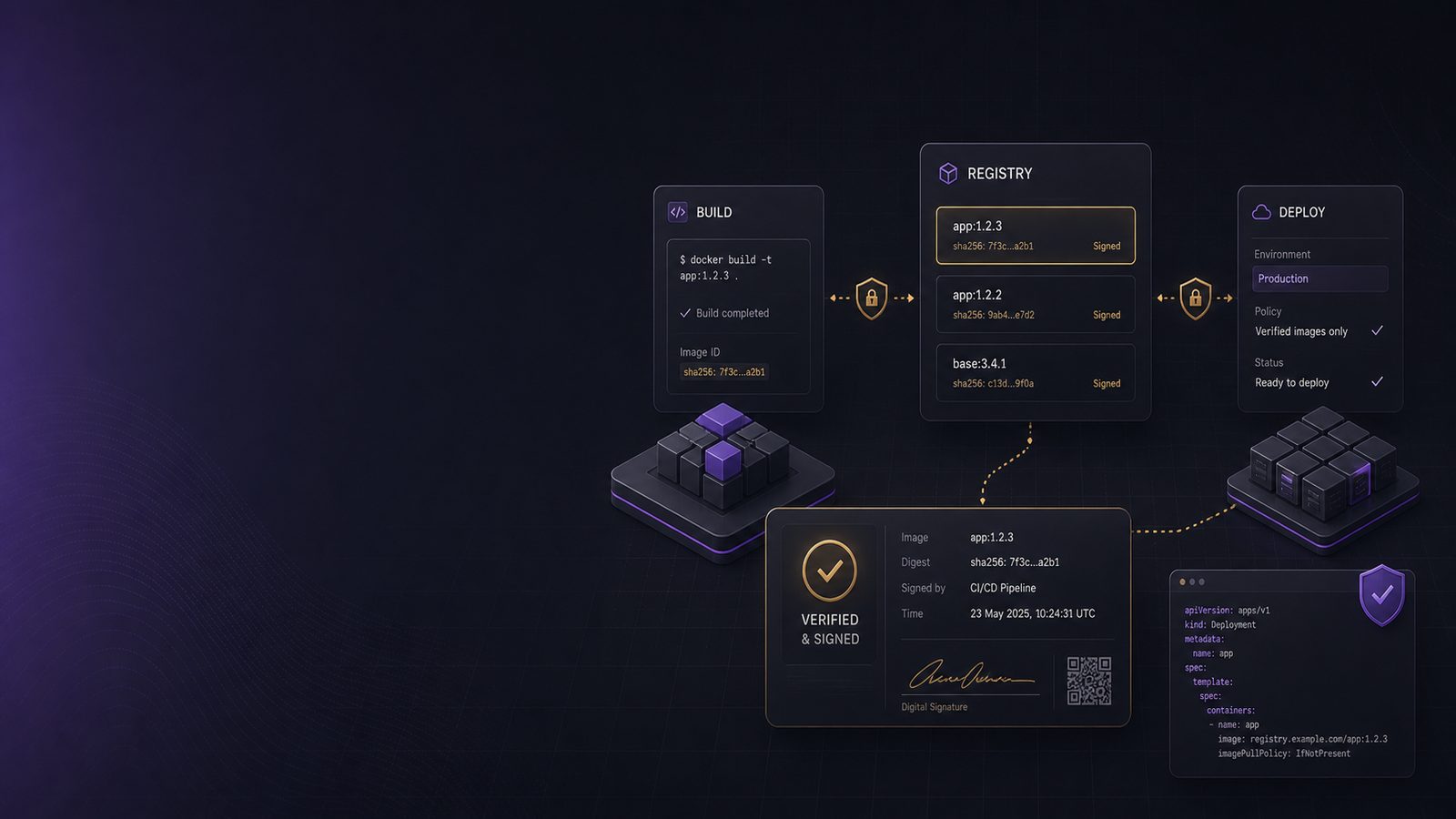
Container images are often treated as if they are trustworthy because they came from a known registry or were built by a known pipeline. In practice, that assumption is weak. A registry can contain multiple tags for the same image, tags can be moved, build systems can be compromised, and a clean vulnerability scan does not prove that the image you are about to run is the one you intended to deploy.
That is where signing and verifying container images with Cosign and Sigstore becomes useful. It gives you a way to bind an image to a trusted build identity, then check that binding before the image is admitted into a cluster or promoted through release stages. For UK SMEs, this is not about chasing perfection. It is about reducing the chance that a tampered or unauthorised image reaches production unnoticed.
If you are already thinking about broader supply chain controls, this fits neatly alongside software supply chain assurance controls, SBOMs, provenance, and registry hardening. Signing does not replace those controls. It strengthens the chain between build, registry, and runtime.
Key takeaways
- Sign container images by digest, not by tag, so the artefact you verify is the artefact you deploy.
- Use Cosign and Sigstore to bind images to trusted build identities and enforce verification before runtime.
- Treat signing as one control in a wider supply chain model that also includes SBOMs, provenance, and CI/CD hardening.
- Start with critical workloads and narrow trust policies, then expand enforcement once the process is stable.
Why container image signing matters in a modern supply chain
Container images are a high-value target because they are reused, promoted across environments, and often deployed automatically. If an attacker can alter an image, or if a developer accidentally publishes the wrong build, the impact can spread quickly. Image signing helps you answer a simple question: is this the exact artefact that came from a trusted build process?
What signing gives you that scanning alone does not
Scanning tells you about known vulnerabilities or misconfigurations in an image. It does not tell you whether the image was built by the expected pipeline, whether it was rebuilt after a compromise, or whether the tag points to the same content it did yesterday. Signing gives you integrity and origin assurance. In other words, it helps you verify who produced the image and whether it has changed since it was signed.
That distinction matters operationally. A clean scan on an unsigned image still leaves you exposed to supply chain tampering. A signed image with a poor policy can still be dangerous if you accept signatures from the wrong identity. The control only works when signing and verification are both enforced.
Where image integrity fits alongside SBOMs and provenance
Image signing is one layer in a wider assurance model. An SBOM tells you what components are present. Provenance tells you how the artefact was built. Signing tells you that the artefact you are handling is the one that was produced by a trusted process. Used together, these controls make it much harder for a malicious or accidental change to slip through unnoticed.
If you want to understand how provenance fits into that picture, it is worth reading about generating and verifying SLSA build provenance for artifacts. Cosign can work with provenance and attestations, so you are not limited to a simple yes or no signature check.
What Cosign and Sigstore are
Sigstore is an open source ecosystem for signing software artefacts. Cosign is the tool most teams use to sign and verify container images, but it also supports other artefacts such as files and attestations. The main idea is to make signing easier to adopt by using identity-based trust rather than forcing every team to manage long-lived private keys from day one.
How Cosign fits into the Sigstore ecosystem
Cosign handles the operational side. It can sign an image, store the signature alongside the image in the registry, and verify that signature later. It also supports keyless signing, which uses an identity token issued during the build rather than a manually managed signing key.
Sigstore provides the supporting trust services. Those services include identity verification and transparency logging, which helps make signing events auditable. For a technical team, the practical benefit is that you can automate signing in CI/CD without building a separate key management system for every repository.
The role of transparency logs and identity-based trust
Transparency logs are append-only records of signing events. They do not stop a bad signature from being created, but they do make the act of signing visible and harder to hide. That matters when you are investigating whether an image was signed, when, and by whom.
Identity-based trust is the other important piece. Rather than trusting a static key file alone, you can require that the signer present a valid identity from a known issuer, such as your CI platform. That means your verification policy can be based on repository, workflow, issuer, and subject claims, not just on possession of a private key.
How the signing and verification flow works
The core flow is straightforward. A build pipeline creates an image, the image is pushed to a registry, Cosign signs the image digest, and a deployment system verifies the signature before allowing the image to run. The important detail is that verification should be done against the digest, not just the tag.
Image digests, signatures, and attestations
An image tag such as latest is only a pointer. It can be moved to a different image without changing the tag name. A digest, by contrast, is the cryptographic content address of the image. If the content changes, the digest changes. That is why signing should always be tied to the digest.
Cosign can also attach attestations. An attestation is a signed statement about the image, such as build provenance, test results, or SBOM metadata. This is useful when you want to verify not only that the image came from a trusted source, but also that it passed specific checks in the pipeline.
Registry interaction and trust decisions at deploy time
At deploy time, the verifier pulls the image reference, checks the signature, validates the identity or key policy, and then decides whether the image is allowed. In Kubernetes, this is commonly enforced through admission control. In simpler environments, it can be enforced in the pipeline before deployment or in the release automation that promotes artefacts between environments.
The important point is that the trust decision should happen as close as possible to runtime. If you only sign images but never verify them, you have added process overhead without gaining much security value.
Keyless signing versus key-based signing
Cosign supports both keyless and key-based approaches. The right choice depends on your operating model, your maturity, and how much control you need over signing material.
When OIDC-backed keyless signing is a good fit
Keyless signing is often a good fit for teams using modern CI/CD platforms. The pipeline obtains a short-lived identity token through OpenID Connect, then Cosign uses that identity to create a signature. This reduces the need to store long-lived private keys in repositories or secret stores.
For many SMEs, that is a strong default because it lowers operational burden and reduces the risk of key leakage. It also makes it easier to rotate trust, because the trust anchor is the identity provider and workflow configuration rather than a static key file.
A typical pattern is to sign only after the build, test, and scan stages have passed. That way, the signature represents a release candidate rather than an arbitrary build output. If you are already using GitHub Actions, GitLab CI, or Azure DevOps, keyless signing can fit naturally into the existing identity model.
When managed keys or hardware-backed keys may still be preferable
Keyless signing is not always the best answer. Some organisations need tighter control over signing keys, especially where build environments are isolated, internet access is restricted, or the trust model requires explicit custody of private keys. In those cases, Cosign can use key-based signing, including keys protected by hardware security modules or managed key services.
That approach can be more complex to operate, but it may be appropriate where you need stronger separation of duties or where your deployment model does not map neatly to OIDC-based identity. The trade-off is usually between operational simplicity and direct control over signing material.
Practical implementation patterns for technical teams
For most teams, the best place to start is the CI/CD pipeline. Build the image once, sign the digest once, and then verify the signature in every downstream environment that matters. Avoid rebuilding the same image in multiple places, because that makes provenance and verification harder to reason about.
Signing images in CI/CD after a successful build
A common pattern is:
docker build -t registry.example.com/app:${GIT_SHA} .
docker push registry.example.com/app:${GIT_SHA}
cosign sign --yes registry.example.com/app@sha256:...
In practice, you should capture the digest from the registry after push, then sign that digest directly. If you are using keyless signing, you will also need to configure the identity provider and issuer trust settings used by your CI platform. The exact command line varies by environment, but the principle is the same: sign the immutable digest, not the mutable tag.
It is also sensible to sign only from protected branches or release workflows. That prevents ad hoc builds from being treated as release artefacts. If your release process already uses environment approvals, signing can be one of the final gates before promotion.
Verifying signatures in admission control or deployment workflows
Verification can happen in several places. A Kubernetes admission controller can reject unsigned images. A deployment pipeline can verify before applying manifests. A platform team can enforce verification through policy-as-code. The right choice depends on where you want the control to fail closed.
For Kubernetes, a policy engine such as Kyverno or Gatekeeper can be used to require signed images. The policy should check the image digest, the expected issuer, and the expected subject or repository. For example, you may allow only images signed by your CI workflow in a specific repository, and only from your trusted identity provider.
A useful pattern is to maintain separate policies for development, staging, and production. Development may allow broader trust for experimentation, while production should be restricted to a small set of release identities. That gives you flexibility without weakening the final control.
Verifying container images before they run
Verification is where the control becomes real. A signature that nobody checks is just metadata. A verification policy that is too broad is also weak, because it may accept images signed by the wrong team or from the wrong workflow.
Policy checks for trusted identities, issuers, and repositories
When designing policy, focus on three things. First, who is allowed to sign. Second, which issuer is trusted. Third, which repository or workflow path is acceptable. In keyless mode, these claims are the heart of the trust decision.
For example, you might require that the signer subject matches a release workflow in your main repository, and that the issuer is your CI platform’s OIDC endpoint. That prevents a signature from a personal account or a different repository from being accepted automatically.
Keep the policy narrow enough to be meaningful, but not so narrow that routine maintenance becomes impossible. If every minor change requires policy edits, teams will work around the control. A good policy is strict on identity and digest, but stable across normal release operations.
Using verification gates in Kubernetes and pipeline tooling
In Kubernetes, verification can be done by admission control or by a controller that checks images before scheduling. In pipeline tooling, verification can be done before promotion to the next environment. In both cases, the result should be the same: unsigned or untrusted images do not progress.
If you are already using infrastructure as code and release automation, treat image verification as another policy gate. That keeps the control visible and repeatable. It also makes it easier to evidence the process later, because the verification logic is part of the deployment workflow rather than a manual checklist.
Working with attestations and provenance
One of the strengths of Cosign is that it can sign more than the image itself. You can attach attestations that describe how the image was built, what tests ran, and what artefacts were produced. This is where image signing starts to support broader supply chain assurance rather than just integrity checking.
Using Cosign to attach build metadata and attestations
Attestations are useful when you want to prove that a build came from a specific pipeline stage or that a scan completed successfully. For example, you can attach a provenance statement generated by the build system, or an SBOM generated during the release process. Cosign can then sign those attestations so they are protected from tampering.
This is particularly valuable when different teams own different parts of the pipeline. The build team can produce the artefact, the security team can define the verification policy, and the platform team can enforce it at deployment. That separation of duties is often easier to manage than trying to make one tool do everything.
How verification of provenance supports supply chain assurance
Provenance verification helps you answer questions such as where the image came from, which source revision was used, and whether the build ran in the expected environment. That gives you better traceability when something looks wrong. It also supports incident response, because you can quickly identify which deployments were based on which build output.
If you are building out a wider control set, it is worth aligning this work with your existing supply chain risk management. Our article on how third-party software introduces cyber risk for UK SMEs covers the broader risk context, while signing and provenance address the artefacts you actually deploy.
Common operational pitfalls
Most failures with image signing are not technical failures in Cosign itself. They are process failures, policy failures, or trust design failures. The good news is that these are usually fixable once you know where to look.
Tag-based deployments instead of digest-based references
The most common mistake is deploying by tag. If your deployment references app:1.2.3 or latest without pinning the digest, you are trusting a mutable pointer. That weakens the value of signing because the tag can be repointed after verification.
Use digest references in deployment manifests and promotion tooling wherever possible. If a platform or workflow still needs tags for usability, treat the tag as a convenience label and the digest as the authoritative reference.
Weak trust policy design and poor key or identity hygiene
Another common issue is accepting any valid signature without checking who signed it. That is not enough. You need to know which identity, which repository, and which workflow produced the image. Otherwise, a signature from the wrong source can still pass verification.
Key hygiene matters too. If you use key-based signing, protect the private key, restrict who can sign, and rotate keys when staff or systems change. If you use keyless signing, protect the identity provider configuration and the CI workflow permissions. In both cases, the trust boundary is only as strong as the surrounding controls.
How this supports broader supply chain controls
Cosign is most effective when it is part of a layered model. That model should include secure build pipelines, least privilege in CI/CD, registry access controls, SBOM generation, provenance, and vulnerability management. Signing does not remove the need for those controls. It makes them more meaningful because you can tie them to a specific artefact.
If you are working towards a more mature software assurance posture, it may help to map this to your existing governance and engineering practices. For example, teams using OWASP SAMM to measure secure development maturity can treat image signing as part of the build and verification practice area. Likewise, teams already investing in secure software development can use Cosign as a concrete control that supports those principles.
A pragmatic rollout approach for UK SMEs
You do not need to sign every image on day one. A sensible rollout is to start with the workloads that would hurt most if tampered with, such as production services, internet-facing applications, and shared platform images. Once the process is stable, expand to more repositories and environments.
A practical sequence is:
- Identify the critical images that should never be deployed unsigned.
- Enable signing in the build pipeline for those images only.
- Define a narrow verification policy for production.
- Test the policy in report-only or non-blocking mode first, if your tooling supports it.
- Move to blocking enforcement once false positives are understood.
- Extend the pattern to staging and lower-risk workloads.
Keep the rollout small enough that the team can support it. The control should reduce operational risk, not create a brittle release process that people avoid. If you already have an ISO 27001-aligned ISMS, this kind of phased implementation also makes it easier to document ownership, exceptions, and review points without overcomplicating the process.
For organisations that want help designing the control set, integrating it into CI/CD, or aligning it with wider assurance work, a short advisory session can be a practical next step. Speak to a consultant if you would like support tailoring the approach to your environment.
Conclusion
Signing and verifying container images with Cosign and Sigstore is a practical way to strengthen trust in the software you deploy. It does not replace scanning, provenance, or registry controls, but it gives you a clear integrity check that can be enforced automatically. For technical teams, the main design choices are whether to use keyless or key-based signing, where to enforce verification, and how tightly to scope trust policy.
For UK SMEs, the value is in making the deployment path more predictable and more defensible. If an image cannot be tied to a trusted build identity and verified at runtime, it should not be treated as production-ready. That is a simple rule, but it is one that can materially improve supply chain resilience when applied consistently.
Frequently asked questions
How can I use Cosign to sign a Docker image?
Build and push the image, capture the immutable digest, then use Cosign to sign that digest from your CI pipeline or release workflow. In most environments, the safer pattern is to sign after tests and scans have passed, and to verify the signature before deployment.
What is Sigstore Cosign?
Cosign is the signing and verification tool in the Sigstore ecosystem. It is used to sign container images and other artefacts, then verify those signatures against either keyless identity claims or managed signing keys.
Can container images be signed and verified reliably?
Yes, provided you verify the digest, restrict trusted identities, and enforce the check at deployment time. The control is only reliable when both signing and verification are part of the normal release process.
Should we use keyless signing or key-based signing?
Keyless signing is often easier for modern CI/CD pipelines because it reduces key management overhead. Key-based or hardware-backed signing may be better where you need tighter custody of signing material or your operating model does not suit OIDC-based identity.
Comments are closed