
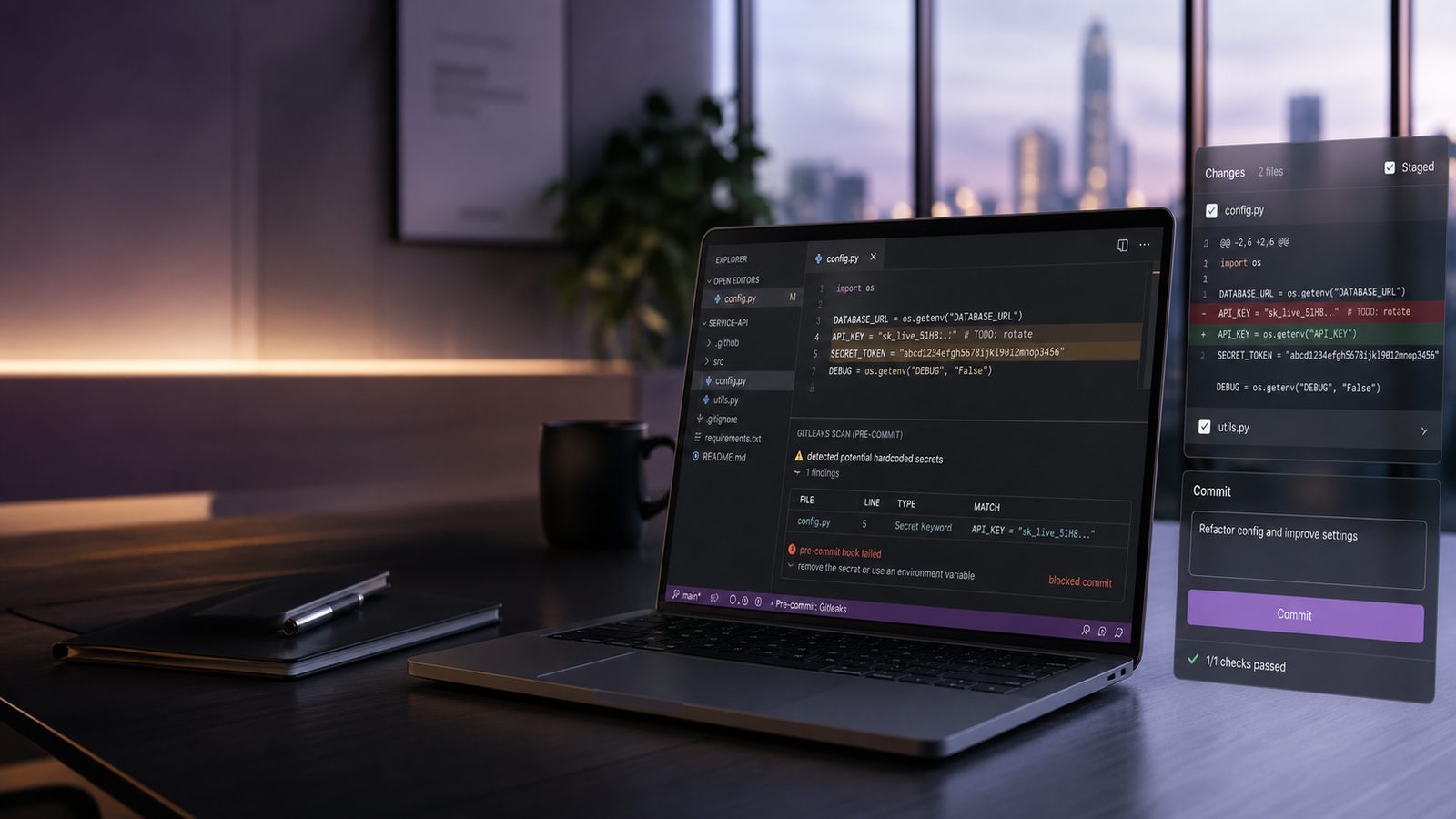
Hardcoded secrets still show up in otherwise mature engineering teams. API keys, cloud credentials, service account tokens, private keys, and webhook secrets often enter a repository during a rushed fix, a proof of concept, or a temporary integration that never gets cleaned up. Once a secret lands in Git history, the problem is no longer just the current branch. It can exist in clones, forks, build logs, caches, and developer laptops.
For UK SMEs, the practical challenge is not whether secret leakage is possible. It is how to reduce the chance of accidental exposure without making everyday development painful. That is where Gitleaks in pre-commit hooks is useful. It gives developers a local guardrail before code is pushed, while still fitting into a broader control set that includes secret storage, CI checks, and incident response. It is also a good example of the wider secure development approach discussed in our article on secure software development.
Key takeaways
- Use Gitleaks in pre-commit hooks to catch accidental secret commits before they leave a developer workstation.
- Back local hooks with CI or repository-side scanning, because pre-commit checks can be bypassed and do not cover all paths.
- Keep the ruleset tight, version-controlled, and consistent across local and pipeline checks to avoid drift and false confidence.
- Treat every real secret finding as a containment event: revoke or rotate the secret, then review how it entered the repository.
Why hardcoded secrets still appear in modern development workflows
Most teams do not hardcode secrets because they think it is a good idea. They do it because it is convenient in the moment. A developer needs to test a payment integration, connect to a staging database, or unblock a deployment. The quickest path is often to paste a token into a config file, a test script, or an environment sample, then forget to remove it later.
Common sources of secret leakage in repositories
In practice, secret leakage often comes from a small number of patterns:
- Application configuration files committed with live credentials instead of placeholders.
- Shell scripts, Terraform files, or CI snippets containing tokens used for local testing.
- Example files such as
.env.examplecopied into real environment files and then committed. - Debugging artefacts, such as temporary logging statements that print bearer tokens or connection strings.
- Private keys pasted into source control during certificate or SSH troubleshooting.
These mistakes are easy to make because they happen at the point of creation, not during a formal release step. That is why relying only on a central pipeline scan is often too late. By the time CI sees the commit, the secret may already have been shared with the remote repository and any downstream mirrors.
Why local checks catch issues earlier than CI alone
Local checks work because they intercept the mistake at the moment the developer is about to commit. That is a better control point than waiting for a pipeline run after the code has already left the workstation. If the developer sees a clear warning in the terminal, they can remove the secret, replace it with a reference to a vault, and recommit before the exposure spreads.
There is also a human factor. Developers are more likely to fix a problem immediately if the feedback is fast and specific. A pre-commit hook that blocks a commit with a precise file and line reference is much more actionable than an email from a pipeline hours later. This is one reason local controls complement, rather than replace, broader secure development practices such as those covered in our guide to embedding security into CI/CD pipelines without slowing teams.
Where Gitleaks fits in a layered secrets management approach
Gitleaks is a secret scanning tool that looks for patterns commonly associated with credentials and other sensitive values. It is best thought of as a detection control, not a storage control. It helps you find secrets that should not be in Git, but it does not stop a team from creating secrets in the wrong place in the first place.
Positioning Gitleaks alongside vaults, environment variables, and policy controls
A sensible layered approach usually looks like this:
- Store secrets in a dedicated secret manager or vault, not in source code.
- Inject secrets at runtime through environment variables, workload identity, or managed identity where possible.
- Use pre-commit scanning to catch accidental inclusion before a commit is created.
- Use server-side scanning in CI and on the repository platform to catch anything that bypasses local checks.
- Define a response process for rotation, revocation, and history cleanup when a secret is found.
This layered model aligns well with broader software supply chain assurance. If your team is already thinking about provenance, dependency integrity, and build trust, secret scanning belongs in the same conversation. It is part of reducing the chance that sensitive material is embedded in artefacts that later move through the delivery chain. Our article on software supply chain assurance controls covers that wider context.
What Gitleaks can and cannot detect
Gitleaks is effective at spotting many common secret formats, including cloud access keys, tokens, private keys, and common credential patterns. It can also be tuned with custom rules for organisation-specific formats. That makes it useful for teams with a mix of public cloud, internal APIs, and third-party integrations.
However, it has limits. It cannot reliably detect every secret type, especially if the value is heavily transformed, split across variables, or disguised in application logic. It also cannot tell whether a string is truly active or merely looks sensitive. That is why you should treat it as one control in a broader programme, not as proof that a repository is clean.
How pre-commit hooks reduce the chance of accidental secret commits
Pre-commit hooks run before a commit is finalised. In a Git workflow, that means the developer gets immediate feedback while the change is still local. If Gitleaks finds a likely secret, the commit can be blocked until the issue is fixed or explicitly reviewed.
Developer workflow impact and trade-offs
The main benefit is speed. The developer sees the issue before it becomes a shared problem. The trade-off is that hooks add friction, particularly if the ruleset is noisy or the repository contains legacy content. If the hook is too aggressive, developers may bypass it, disable it, or stop trusting it.
That is why implementation quality matters. A good pre-commit setup should be fast, predictable, and consistent across the team. It should scan only the staged content by default, produce readable output, and avoid unnecessary delays. If the hook routinely adds several seconds to every commit, adoption will suffer.
Local enforcement versus server-side scanning
Local enforcement is useful, but it is not enough on its own. Hooks can be bypassed with --no-verify, a different Git client, or a direct push from another system. They also do not help with historical commits already present in the repository.
For that reason, the stronger pattern is dual enforcement. Use pre-commit hooks for early detection and CI or repository-side scanning for backstop coverage. If a secret slips past the workstation, the pipeline should still fail the build or at least raise a high-priority alert. This is the same general principle used in other defensive controls: the first layer should be convenient, and the second layer should be authoritative.
Configuring Gitleaks for pre-commit use
There are two common ways to use Gitleaks locally. One is to install and run it directly in a developer workflow. The other is to manage it through the pre-commit framework, which standardises hook installation across repositories. For most SME engineering teams, the pre-commit framework is easier to operationalise because it gives you a repeatable configuration and a single onboarding pattern.
Using the pre-commit framework with Gitleaks
A typical setup uses a .pre-commit-config.yaml file in the repository root. The hook can point to the Gitleaks repository and run against staged files before commit. A simplified example looks like this:
repos:
  - repo: https://github.com/gitleaks/gitleaks
    rev: v8.24.2
    hooks:
      - id: gitleaks
        args: ["protect", "--staged", "--redact"]
In practice, you should pin the version rather than floating on main. That gives you predictable behaviour and makes it easier to test updates. The exact arguments may vary depending on how you want the hook to behave, but the principle is the same: scan staged content, redact sensitive values in output, and fail the commit if a match is found.
Teams that already use pre-commit for formatting, linting, or static analysis can add Gitleaks as another hook in the same workflow. That keeps security checks close to the developer’s normal routine rather than bolted on separately.
Choosing a baseline config and tuning detection rules
Gitleaks ships with a default ruleset, but most teams need some tuning. A baseline configuration should reflect the technologies you actually use. For example, a SaaS team using AWS, GitHub, and Stripe will need different coverage from a team using Azure, internal APIs, and Kubernetes service accounts.
When tuning rules, start with the default coverage and then add organisation-specific patterns only where there is a clear need. Avoid the temptation to over-customise too early. If you make the rules too narrow, you will miss real secrets. If you make them too broad, you will create noise and reduce trust in the tool.
A practical approach is to test the hook against a small sample of known benign strings and a few controlled test secrets in a non-production repository. That helps you understand what the tool flags before you roll it out more widely. It also gives you a chance to agree on how developers should respond when a match appears.
Handling false positives and known exceptions safely
No secret scanner is perfect. False positives are normal, especially in repositories that contain sample data, test fixtures, or legacy code. The goal is not to eliminate every false positive. The goal is to manage exceptions in a way that does not weaken the control overall.
Using allowlists and ignore rules without weakening coverage
Gitleaks supports allowlists and ignore rules. These should be used sparingly and with clear ownership. A good rule of thumb is to allowlist only when you can explain why the match is safe, why it is unavoidable, and how the exception will be reviewed later.
For example, a test fixture may contain a string that looks like an API key but is deliberately fake. In that case, an allowlist entry may be reasonable if it is tightly scoped to the file or exact pattern. What you should avoid is a broad repository-wide ignore rule that suppresses all findings of a given type. That tends to hide real problems alongside the false ones.
It is also worth separating temporary exceptions from permanent ones. Temporary exceptions should have an expiry date or a review point. Permanent exceptions should be rare and documented in a way that your team can revisit during maintenance or security review.
Managing line-level exceptions and review expectations
Where possible, keep exceptions as narrow as the tool allows. Line-level or file-level exceptions are easier to justify than global exclusions. They also make it easier for reviewers to understand what has been accepted and why.
From a process perspective, any exception should be visible in code review. That means the reviewer should see both the finding and the rationale for suppressing it. If your team uses pull requests, the exception should be discussed there rather than hidden in a local developer configuration file.
Integrating Gitleaks into GitHub and CI/CD workflows
Pre-commit hooks are only one part of the picture. To make secret detection reliable, the same control should be present in your CI/CD pipeline and, where possible, in repository-level protections. That way, a developer who bypasses the hook still faces a second check before merge or release.
Keeping local hooks and pipeline checks consistent
Consistency matters. If the local hook uses one ruleset and the pipeline uses another, developers will see different results in different places. That creates confusion and leads to avoidable disputes about whether a finding is real.
The simplest way to avoid drift is to store the Gitleaks configuration in the repository and reference the same file from both the pre-commit hook and the CI job. That gives you one source of truth for rules, allowlists, and exclusions. It also makes peer review easier because changes to detection logic are version-controlled alongside the code.
In GitHub-based workflows, you can run Gitleaks in a job that checks pull requests and main branch merges. If the scan finds a secret, fail the job and require remediation before merge. That is especially useful for teams with multiple contributors or external contractors, where local hook installation cannot be assumed.
Failing builds, reporting findings, and preserving developer experience
When a scan fails, the output should be actionable. Developers need to know which file triggered the finding, what type of secret was detected, and what to do next. Avoid dumping a wall of raw output into the build log if a concise summary will do.
At the same time, do not hide the problem. If the pipeline only posts a low-priority warning, the issue may be ignored. For live secrets, the safer default is to block the merge and require a fix. You can still make the developer experience reasonable by keeping the message clear and by documenting the remediation steps in your engineering handbook.
Operationalising secret detection across the team
Tools only work when the surrounding process is clear. If you want Gitleaks to become part of normal engineering practice, you need onboarding, ownership, and a simple standard for how repositories are maintained.
Developer onboarding, policy, and repository standards
Every new repository should include the pre-commit configuration, the Gitleaks ruleset, and a short note on how to install the hooks. New developers should be told what the hook does, why it exists, and how to handle a finding. That short explanation matters because people are more likely to respect a control they understand.
Repository standards should also make it clear that secrets belong in a vault or secret manager, not in source control. If your team uses environment variables, managed identities, or runtime injection, document the approved pattern and make it the default in templates and starter projects. That reduces the temptation to improvise.
Monitoring adoption and improving coverage over time
It is worth measuring how often the hook is installed, how many findings are real, and where the false positives cluster. Those metrics help you tune the ruleset and identify training gaps. If one team repeatedly commits secrets in the same file type, that is a sign that the workflow or template needs improvement.
Over time, you should also review whether the control is still aligned to your stack. New cloud services, new frameworks, and new integration patterns can introduce new secret formats. A quarterly review of the ruleset is usually enough for smaller teams, provided there is a clear process for urgent updates when a new credential type is introduced.
Common implementation pitfalls and how to avoid them
The most common mistake is treating pre-commit scanning as a complete solution. It is not. It reduces risk, but it does not eliminate it. Other common pitfalls include overly broad ignore rules, inconsistent configuration between repositories, and a lack of response process when a real secret is found.
Another issue is hook bypass. Developers sometimes skip hooks to save time, especially if they are under pressure. If that happens often, it usually means the control is too noisy or too slow. Fix the underlying usability problem rather than relying on policy language alone.
Coverage gaps also matter. If only some repositories have the hook, or only some teams use it, you will end up with uneven protection. Standardising the configuration across repositories is usually more effective than trying to manage each project as a special case.
Finally, remember that secret scanning is a control, not a guarantee. It should sit alongside secure coding practices, secret management, access control, and incident response. If you want a broader view of how secrets fit into application design, our article on secrets management using key vaults and HSMs is a useful companion.
How to respond when Gitleaks finds a secret
When Gitleaks flags a real secret, treat it as a containment issue first and a code quality issue second. The immediate priority is to assume the value may already be exposed and to reduce the window of misuse.
That usually means revoking or rotating the secret, checking whether it has been used elsewhere, and replacing it with a new value stored in the approved secret manager. If the secret has already been committed, you should also assess whether the repository history needs to be rewritten and whether any downstream copies need attention. The exact response will depend on the type of secret and where it has been shared, but speed and consistency matter.
After containment, review how the secret entered the repository. Was it a one-off mistake, a missing template, a poor deployment pattern, or a gap in developer training? The answer should feed back into your controls so the same issue is less likely to recur.
For technical teams that want to make this repeatable, the best outcome is a small set of standard actions: detect, contain, rotate, review, and improve. That keeps the process practical without turning every finding into a major incident.
If you would like help designing a pragmatic secret scanning approach that fits your delivery model, we can support that as part of wider ISO 27001-aligned advisory work. Speak to a consultant if you want to discuss how to build this into your development workflow.
Frequently asked questions
Can Gitleaks scan every secret type reliably?
No. Gitleaks is effective for many common credential patterns, but it will not detect every secret, especially if values are transformed, split across variables, or hidden in unusual formats. It should be treated as a strong detection control, not a guarantee.
Should pre-commit hooks replace CI-based secret scanning?
No. Pre-commit hooks are useful for early feedback, but they can be bypassed and only protect the local commit path. CI-based scanning should remain in place as a backstop so that secrets are still detected before merge or release.
How do I ignore a known false positive in Gitleaks without weakening the whole rule set?
Use the narrowest allowlist or ignore rule possible, ideally scoped to a specific file, line, or exact pattern. Avoid broad repository-wide exclusions, and make sure every exception is reviewed and documented.
What should I do first if Gitleaks finds a real secret?
Assume the secret may already be exposed, then revoke or rotate it as quickly as possible. After that, replace it with a value stored in the approved secret management system and review how it was committed.
Comments are closed