
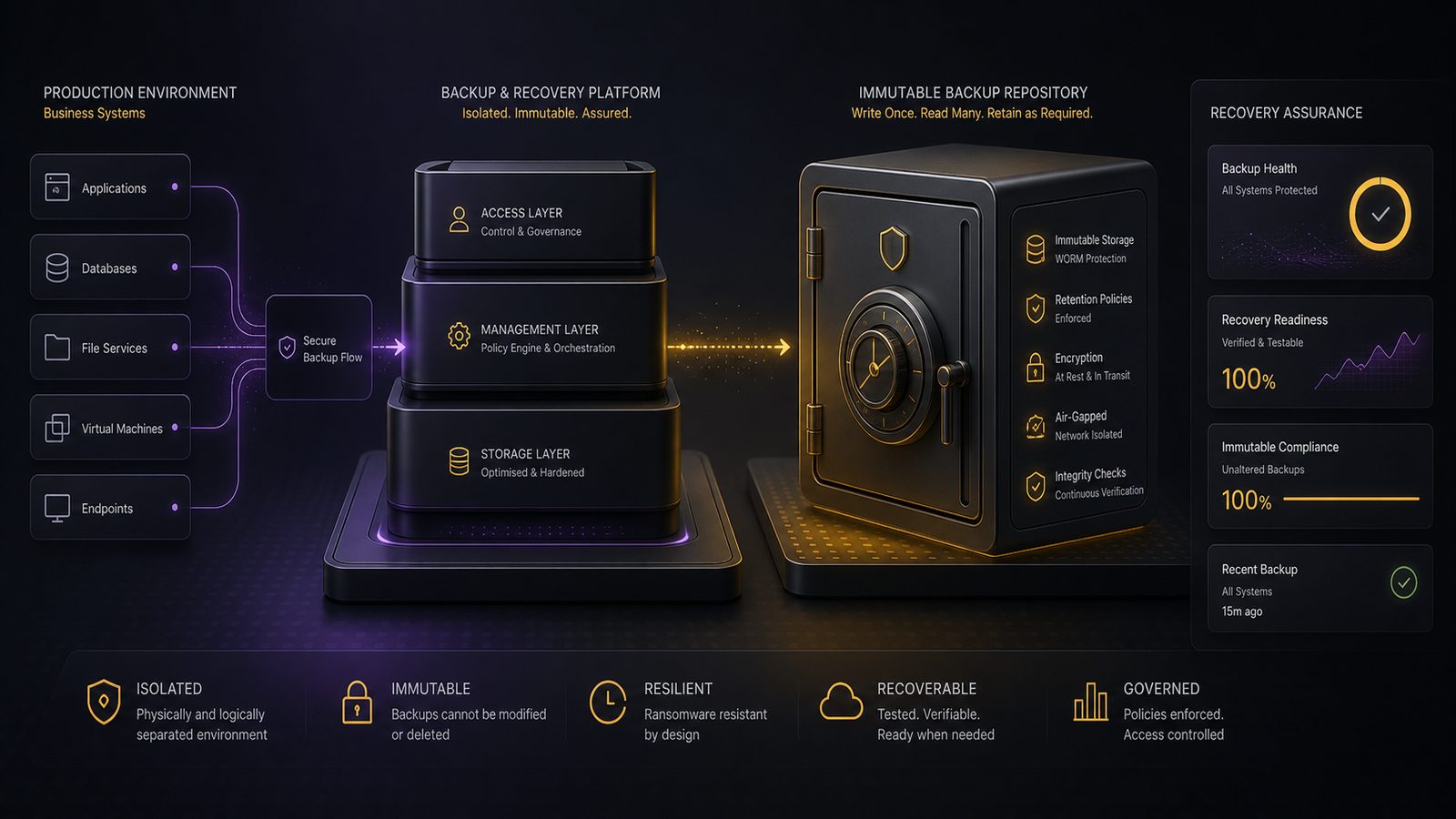
Designing immutable backup solutions to resist ransomware
Ransomware planning is often framed as a prevention problem, but for most UK SMEs the more realistic objective is to make recovery dependable when prevention fails. That is where immutable backups matter. If an attacker can encrypt, delete, or tamper with your backups, recovery becomes slower, more expensive, and far less certain. If the backup set cannot be altered within the retention window, you preserve a clean recovery path even when production systems are compromised.
This is not a replacement for endpoint hardening, identity controls, or detection. It is a recovery control that sits alongside those measures. If you are already working through your wider backup strategy, it is worth reading our backup and recovery architecture best practices guide as the broader foundation. This article focuses specifically on immutability, control-plane protection, and the operational checks that make the design trustworthy.
Key takeaways
- Immutable backups protect recovery points from deletion or tampering, which is critical when ransomware reaches backup infrastructure.
- Treat backup administration as a privileged function with separate identities, MFA, and tightly controlled break-glass access.
- Use immutability alongside offline or air-gapped copies, not as a standalone resilience strategy.
- Test restores from the immutable copy under incident conditions and capture evidence that policy changes and deletions are blocked.
Why immutable backups matter in a ransomware recovery strategy
Immutable backups change the attacker’s options. In a conventional backup design, a compromised admin account or backup API key may be enough to delete restore points, shorten retention, or corrupt the repository. With immutability, the attacker may still disrupt production, but they cannot easily destroy the last known-good copies within the protected retention period. That can be the difference between restoring from a trusted point and paying for a prolonged rebuild.
Immutability also reduces the pressure to make risky decisions during an incident. If you know your backup chain includes protected restore points, you are less likely to restore from a potentially tainted snapshot or rush into a partial rebuild just to get services back. In practice, immutable backups are most effective when combined with offline or air-gapped copies for longer-term resilience. Air-gapping removes network reachability; immutability removes the ability to alter data even when the storage is reachable. Those are related, but not identical, protections.
What makes a backup immutable
At a technical level, immutability means data can be written, but not changed or deleted until a defined retention period expires. The exact mechanism varies by platform. In object storage, this is often implemented using write once, read many behaviour and object lock features. In backup software, it may be enforced by a hardened repository, append-only storage, or a retention lock on backup chains. In all cases, the important property is the same: once the backup is committed, ordinary administrative actions should not be able to alter it.
Retention periods need careful thought. Too short, and the backup set may not outlast the attacker’s dwell time. Too long, and you create unnecessary storage cost and operational clutter. Deletion protection is also important, but it is not the same as immutability. A system that merely asks for confirmation before deletion is still mutable. Likewise, legal hold features can be useful for governance, but they are not a substitute for a technical control that prevents tampering.
Threat model: how ransomware targets backup infrastructure
Attackers usually go after backup infrastructure early because it is a high-value target. Once they have valid credentials, they may look for backup consoles, repository servers, storage accounts, snapshot management interfaces, and privileged service accounts. If they can reach those systems from the same identity plane as production, they can often move faster than defenders expect.
Credential theft and privilege escalation are common routes. A phished account, a reused password, a stolen session token, or a compromised helpdesk workflow can all lead to backup abuse. In some environments, the backup platform itself becomes the easiest path to destructive action because it has broad access by design. That is why backup administration should be treated as a privileged function, not just another IT task. If you are mapping this into a wider identity strategy, our Zero Trust architectures with Entra ID article is a useful companion.
Attackers also target snapshots because they are often mistaken for backups. Snapshots are useful, but they usually live close to the production platform and can be deleted or rolled back by anyone with sufficient storage or hypervisor privileges. They are a resilience feature, not a complete ransomware defence. If snapshots are your only recovery mechanism, you are relying on the same trust zone that the attacker may already control.
Core design principles for immutable backup architectures
The first principle is separation. Separate identities, separate admin paths, and separate trust zones. Production administrators should not automatically be able to manage backup retention, repository deletion, or object lock settings. Backup operators should have only the rights they need to run jobs, verify status, and perform restores. Where possible, use a distinct identity provider or at least a distinct administrative role set for backup management.
Second, apply least privilege and strong authentication. Multifactor authentication should be mandatory for backup consoles, cloud storage portals, and any privileged API access. For higher-risk actions such as disabling immutability, changing retention, or deleting repositories, use break-glass access with additional controls such as approval workflows, time-bound elevation, and alerting. Break-glass access should be rare, logged, and tested, not a standing privilege that nobody remembers to review.
Third, make immutability the default. The design should assume that backup data is protected unless there is a deliberate, controlled exception. That means retention lock enabled by default, deletion paths restricted, and any mutable staging area kept separate from the protected repository. If you need a temporary mutable zone for backup processing, keep it short-lived and isolated from the final immutable copy.
Platform patterns across on-premises and cloud environments
Cloud object storage is often the cleanest way to implement immutability because the storage layer can enforce retention independently of the backup server. AWS S3 Object Lock, Azure Blob immutability policies, and similar features in other platforms can provide a strong technical barrier when configured correctly. The key point is that the policy must be applied to the bucket or container before data is written, and the administrative permissions around it must be tightly controlled. If the same account can both set and remove the lock, the control is weaker than it looks.
Backup platforms such as Veeam, Commvault, Rubrik, Cohesity, and Datto also offer immutability patterns, usually through hardened repositories, immutable backup copies, or retention lock features. These can work well, especially for SMEs that want a more integrated operational model. The design question is not whether the product has an immutability feature, but whether the feature is enforced in a way that survives compromise of the backup application itself. If the backup server can still delete the repository, the control is incomplete.
NAS and storage-array options can help in some environments, but they need careful scrutiny. A storage snapshot on a NAS is not automatically immutable. If the same administrative domain controls both production and storage, an attacker with sufficient privilege may still be able to delete or roll back the data. These options are usually better as part of a layered design than as the sole protected copy. For many SMEs, a practical pattern is production backups to a local repository, then a second copy to immutable object storage or a hardened offsite repository.
How to choose retention, versioning, and recovery points
Retention should be driven by the likely ransomware dwell time, the business recovery objectives, and the criticality of the data. If you only keep a few days of protected copies, you may miss the point at which the attacker first gained access. For many organisations, a tiered approach works better: short-term immutable copies for fast recovery, plus longer-term protected copies for deeper rollback. That gives you both operational speed and resilience against delayed detection.
Versioning matters because a single backup generation is a fragile assumption. If the latest backup is corrupted before the attack is detected, you need earlier restore points. Keep enough generations to span the period in which compromise could have gone unnoticed. This is especially important where identity compromise is involved, because attackers may spend time exploring, exfiltrating, and staging before they trigger encryption.
Storage cost is real, so the answer is not to keep everything forever. Instead, align retention to the data’s value and the recovery window you actually need. Critical systems may justify longer immutable retention than low-value file shares. The point is to avoid a one-size-fits-all policy that either wastes money or leaves you exposed.
Hardening the backup control plane
The backup control plane is the set of consoles, APIs, service accounts, and management hosts used to operate the backup environment. It deserves the same level of hardening as any privileged management plane. Place backup servers and repositories in a dedicated network segment, restrict inbound management access, and avoid direct internet exposure. Where possible, require management access through a jump host or privileged access workstation rather than from everyday user endpoints.
Service accounts should be tightly scoped and rotated. Avoid using shared administrator accounts for backup operations. If the platform supports role-based access control, separate job administration, restore operations, repository management, and security policy changes. This reduces the chance that a single compromised account can both alter the policy and destroy the evidence.
Logging is essential. You need visibility of failed login attempts, changes to retention settings, repository deletions, immutability changes, and unusual restore activity. Feed those events into your SIEM or monitoring platform and alert on destructive actions, not just authentication failures. If you already run centralised logging, our designing log pipelines for detection engineering article covers the broader pipeline considerations. For backup systems, the most useful detections are often the simplest ones: deletion attempts, policy changes, and creation of new privileged accounts.
Operational controls that make immutability effective
Immutability is only useful if the backup jobs are actually completing and the restore points are valid. Monitor job success rates, repository capacity, copy lag, and failed verification tasks. A backup set that is immutable but incomplete is still a business problem. Look for anomalies such as a sudden drop in backup volume, repeated authentication failures, or a new pattern of backup deletions outside normal change windows.
Restore testing is the real proof. Test under incident conditions, not just in a calm maintenance window. That means validating that you can restore from the immutable copy when the primary environment is unavailable, credentials are suspected to be compromised, or the backup server itself is treated as untrusted. Our testing backup restoration under incident conditions guide goes into more detail on how to structure those exercises.
Key management and secret rotation also matter. If your immutable storage depends on encryption keys, make sure the key management system is separated from the backup administration path. Rotate secrets for backup APIs and service accounts on a defined schedule, and review privileged access regularly. A strong immutable design can still be undermined by a long-lived credential that was never revisited after deployment.
Common design mistakes to avoid
The most common mistake is treating snapshots as equivalent to immutable backups. They are not. Snapshots are useful for short-term rollback, but they usually sit too close to production to be trusted as the only recovery layer. Another mistake is keeping immutable storage in the same administrative domain as production. If the same compromised identity can manage both, the attacker may still be able to destroy your recovery path.
It is also easy to leave deletion paths too open. API keys, root credentials, and emergency access accounts should be protected with the same care as financial systems. If a backup platform can be reset, reconfigured, or wiped by a single broadly privileged account, the immutability feature may not survive a real attack. Finally, do not assume that a cloud provider’s storage feature alone solves the problem. The surrounding identity, policy, and logging controls are what make the design defensible.
A practical implementation checklist for UK SMEs
For a minimum viable design, start with three copies of important data, at least one copy offsite, and at least one copy protected by immutability. Separate backup administration from production administration. Enforce multifactor authentication on all privileged backup access. Restrict network access to backup management interfaces. Enable logging for policy changes, deletion attempts, and restore activity. Then test a full restore from the immutable copy.
When speaking to a backup or cloud provider, ask specific questions. Can immutability be set before data is written? Who can change or remove the retention policy? Is there a separate role for repository administration? What happens if the backup server is compromised? Can the provider demonstrate how deletion is prevented at the storage layer? How are logs exported for independent monitoring? If the answers are vague, the design probably needs more work.
Before you rely on the solution, validate that the protected copy is actually unreachable to ordinary administrators, that retention cannot be shortened without controlled escalation, and that restore procedures work from a clean management context. If you are aligning this with broader governance or an ISMS, the design should be reflected in risk treatment decisions, operational procedures, and evidence of periodic testing. That is where technical control and management discipline meet.
How to test that immutable backups will survive a real incident
Testing should cover three things: restore validation, access failure testing, and tamper-resistance checks. Restore validation confirms that the data can be recovered and the application can use it. Access failure testing confirms that the restore can still be performed when production credentials are unavailable or suspected compromised. Tamper-resistance checks confirm that ordinary administrative actions cannot delete or alter the protected copy during the retention period.
Capture evidence during testing. Record the backup job IDs, retention settings, repository identifiers, restore timestamps, and any failed attempts to change policy or delete data. Keep screenshots or exported logs where appropriate, but focus on operational evidence rather than paperwork for its own sake. The goal is to prove to yourself that the design works under pressure, not to create a box-ticking exercise.
It is also worth rehearsing the decision path for when to use the immutable copy. If the latest backup is suspect, who authorises the restore point selection? Who validates that the data is clean enough to restore? Who owns the communication with operations and leadership? These are practical questions, and they are easier to answer before an incident than during one.
FAQ
Are immutable backups enough on their own? No. They are a strong recovery control, but they work best alongside identity hardening, endpoint protection, segmentation, logging, and tested incident response. If the attacker can still disrupt production, immutable backups help you recover, but they do not stop the incident from happening.
What is the difference between immutable backups and air-gapped backups? Air-gapped backups are isolated from the network, either physically or logically, so they are harder to reach. Immutable backups may still be online, but their contents cannot be altered or deleted within the retention window. Many resilient designs use both.
Can cloud backups really be made immutable? Yes, provided the storage platform supports retention locking or write-once behaviour and the surrounding identity controls are properly designed. The important part is not just enabling the feature, but making sure the same compromised account cannot disable it.
How long should immutable backup retention be? There is no universal answer. Retention should reflect your detection window, recovery objectives, and storage constraints. Many SMEs benefit from a tiered model with short-term immutable copies for rapid recovery and longer-term protected copies for deeper rollback.
If you want help reviewing your backup architecture, tightening the control plane, or aligning the design to a risk-based ISMS, our consultants can help you work through the trade-offs in a practical way.
Comments are closed