
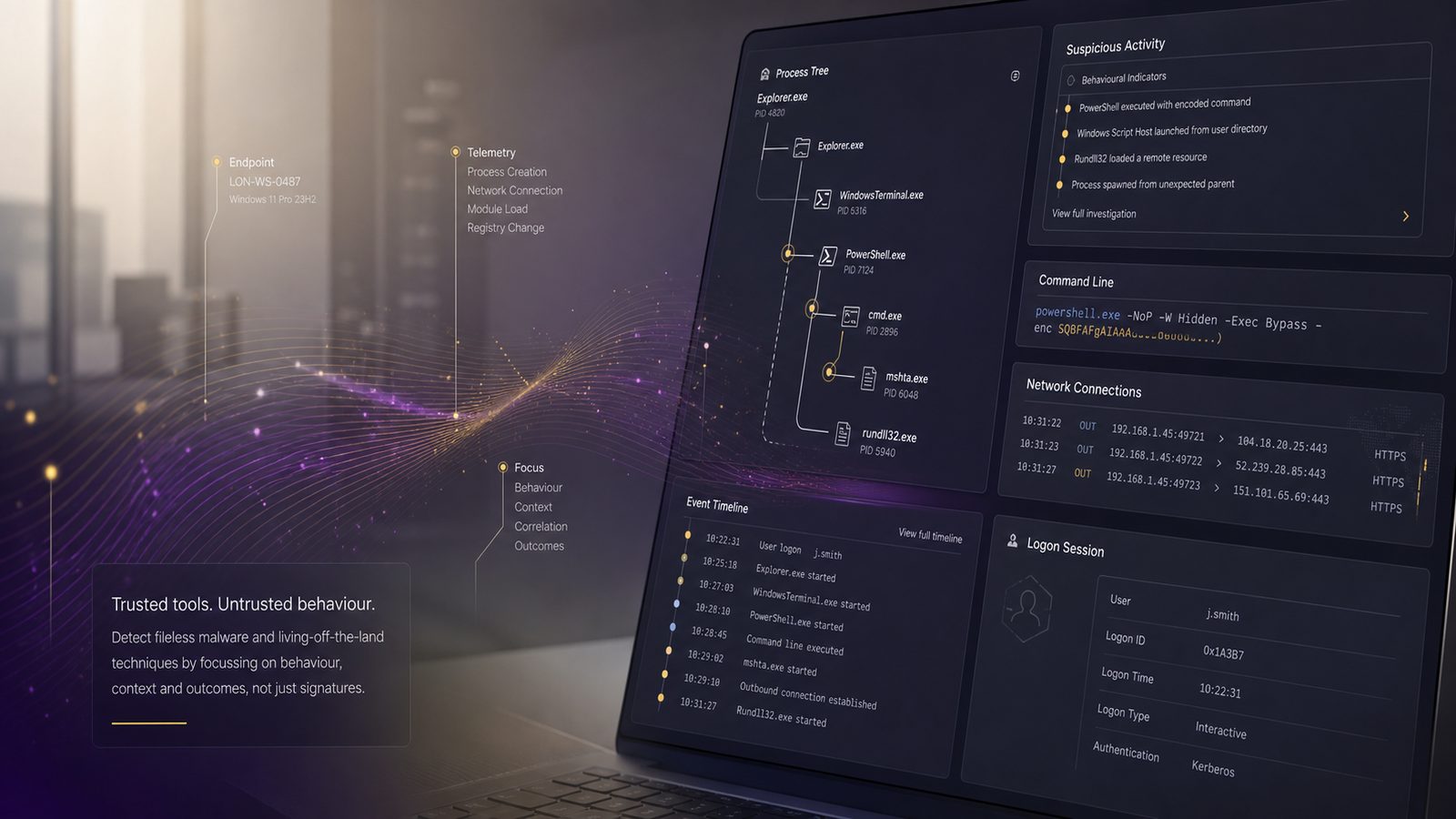
Fileless malware and living-off-the-land attacks can be difficult to spot because they often use legitimate tools already present on a device. That does not make them invisible, but it does mean small teams need to think carefully about what they log, what they alert on, and how they investigate unusual activity.
For UK SMEs, the aim is not to build a large security operations function overnight. It is to improve visibility in the places where these attacks tend to blend in: endpoints, identity systems, and script activity. With a few sensible controls and a clear triage process, you can make suspicious behaviour much easier to notice.
What fileless malware and living-off-the-land attacks are
Fileless malware is a broad term for malicious activity that does not rely on a traditional executable file sitting on disk in the usual way. Instead, it may run in memory, use scripts, or abuse built-in features to carry out its task. Living-off-the-land attacks take that idea further by using trusted tools already available in the environment, such as command shells, scripting engines, remote management tools, or administrative utilities.
How these attacks differ from traditional malware
Traditional malware often leaves clearer traces, such as a suspicious file on disk, a known hash, or a predictable installation path. Fileless and living-off-the-land activity can be more subtle because the tool itself may be legitimate. The problem is not the tool, but how it is being used.
That means detection often depends less on file scanning alone and more on behaviour. For example, a script engine starting unexpectedly, a management tool launching another process, or an account performing actions outside its normal pattern can all be useful clues.
Why they can be harder to spot in small environments
Many SMEs have limited logging, a small number of security tools, and only a few people who can review alerts. In that setting, unusual use of built-in tools can be missed because it looks like routine administration. If the business also has inconsistent endpoint coverage or weak identity monitoring, the attacker may have room to move without drawing attention.
The good news is that you do not need perfect visibility to improve detection. You need enough telemetry to answer a few basic questions: which tool ran, which account used it, what it launched, and whether that behaviour is normal.
Why SMEs should care about this risk
These attacks matter because they can reduce the time between initial access and meaningful impact. A threat actor that can use existing tools may avoid obvious malware alerts and spend longer in the environment. For a small business, that can increase the chance of account misuse, data exposure, service disruption, or a more complex incident to investigate.
Common business impacts without overstating the threat
The practical impact is usually business interruption rather than dramatic technical damage. You may see unusual logins, unauthorised access to shared files, suspicious mailbox activity, or systems behaving erratically. In some cases, the issue is contained quickly. In others, the business loses time while staff work out whether the activity is legitimate.
That uncertainty has a cost. It can slow operations, distract IT staff, and make it harder to trust the environment. For SMEs with lean teams, even a short period of confusion can be disruptive.
Where visibility gaps usually appear
The most common gaps are straightforward. Endpoint logs may be incomplete, PowerShell or script logging may be disabled, and identity logs may not be retained for long enough to support investigation. Some businesses also rely on antivirus alone, which is useful but rarely enough on its own for this type of activity.
Another common issue is that alerts are too broad. If every administrative action generates noise, the genuinely unusual events are easier to miss. Good detection is as much about reducing noise as it is about adding more alerts.
Typical signs that may indicate suspicious activity
There is no single indicator that proves fileless malware or living-off-the-land abuse. Instead, look for patterns that do not fit normal use. A single odd event may be harmless. Several related events in a short period deserve attention.
Unusual use of trusted tools and scripts
Pay attention when tools that are normally used by administrators appear in unusual contexts. Examples include scripting engines running from user profiles, command shells launching encoded or obfuscated commands, or remote management tools being used outside normal support hours.
Also watch for parent-child process chains that do not make sense. In plain English, that means one programme starting another in a way that is unusual for your environment. If a document viewer starts a shell, or a script engine starts a download utility, that is worth checking.
Unexpected process behaviour and account activity
Process behaviour can reveal a lot. Look for short-lived processes that appear and disappear quickly, repeated launches of the same command, or processes running under accounts that do not usually perform those actions. Identity activity matters too. A user account that suddenly authenticates from an unfamiliar device, at an odd time, or performs administrative tasks it has never done before should prompt review.
For SMEs, the key is to compare activity with what is normal for that person, device, and role. A helpdesk account behaving like a domain administrator is a useful example of something that should not be ignored.
What to log and monitor for better detection
Good detection starts with the right telemetry. If you cannot see the relevant events, you cannot reliably distinguish normal administration from suspicious behaviour. The aim is to collect enough detail to support triage without overwhelming the team.
Endpoint events that are most useful
At endpoint level, prioritise process creation events, command-line arguments, script execution, and network connections made by unusual processes. These events help you see what started, how it was launched, and whether it tried to reach out to another system.
It is also useful to log module loading and security-relevant changes where your tooling supports it. If a trusted process suddenly loads something unexpected, that can be a clue. For smaller teams, the main point is to keep the focus on a manageable set of high-value events rather than trying to capture everything.
Identity and PowerShell-related telemetry to prioritise
Identity logs are essential because many attacks rely on valid accounts. Monitor sign-ins, privilege changes, failed logon patterns, and unusual use of administrative roles. If your environment uses Microsoft 365 or similar services, make sure you can review sign-in history and mailbox or account activity when needed.
PowerShell deserves particular attention because it is a common administration tool and a common abuse path. Where possible, enable script block logging, module logging, and transcription in a controlled way. These logs can show what was actually executed, which is often more useful than the command line alone.
Do not treat this as a purely technical exercise. Decide who will review the logs, how long they are retained, and what events trigger escalation. A log that nobody checks is not much help.
Practical detection approaches for small teams
You do not need a complex detection engineering programme to start improving coverage. A few well-chosen rules and a simple baseline can go a long way. The goal is to detect behaviour that is unusual for your business, not to chase every possible attacker technique.
Using baselines to spot anomalies
Start by understanding normal use. Which admin tools are used, by whom, and at what times? Which devices run scripts regularly? Which accounts need elevated access, and when do they use it? Once you know the normal pattern, unusual activity becomes easier to spot.
Baselines do not need to be mathematically sophisticated. A simple list of expected tools, accounts, and behaviours is often enough to identify outliers. For example, if only two staff members use a remote management tool, any other use should stand out immediately.
Building simple alert logic without overcomplicating it
Simple alert logic is often more effective than a large number of weak rules. Focus on combinations of events rather than single events. For example, alert when a scripting engine starts a network connection, when an administrative tool is launched by a non-admin account, or when a privileged account is used from an unusual device.
Keep thresholds sensible. If a rule fires constantly, it will be ignored. If it is too narrow, it will miss useful activity. Review alerts regularly and tune them based on what your team actually sees. That is usually more valuable than trying to copy a large enterprise detection stack.
Reducing exposure through hardening and control choices
Detection works better when the environment is harder to abuse. You do not need to remove every built-in tool, but you should reduce unnecessary flexibility. The more tightly you control scripts, admin rights, and application behaviour, the fewer places an attacker can hide.
Limiting script abuse and unnecessary admin rights
Restrict who can run administrative tools and who can use elevated privileges. Separate standard user activity from admin work wherever possible. If staff only need admin rights occasionally, use just-in-time access or a controlled elevation process rather than permanent privilege.
For scripts, consider whether all users really need to run them. If not, limit execution to approved locations or signed scripts where practical. Even modest restrictions can make abuse more visible and reduce the chance of casual misuse.
It also helps to review service accounts and shared admin accounts. These are often overlooked and can create blind spots if they are used for too many tasks.
Improving endpoint protection and application control
Endpoint protection should do more than look for known malware. Make sure it can detect suspicious behaviour, script abuse, and unusual process relationships where your product supports that. Application control can also help by limiting what can run and where it can run from.
For SMEs, the best approach is usually layered. Use endpoint protection, sensible application control, and logging together. None of these controls is perfect on its own, but together they make suspicious activity easier to identify and contain.
How to investigate alerts without disrupting the business
When an alert fires, the first step is to stay calm and gather context. The aim is to decide whether the activity is expected, suspicious, or clearly malicious. A structured triage process helps avoid unnecessary disruption.
Triage questions to ask first
Start with a few practical questions. Which account was involved? Which device generated the alert? What tool or process was used? Was the activity expected for that user role and time of day? Has the same behaviour been seen before?
If the answer to any of these is unclear, look for supporting evidence in endpoint, identity, and script logs. Check whether the process spawned other processes, whether the account had recent privilege changes, and whether there were unusual sign-ins or remote connections. The aim is to build a short timeline, not to analyse every log line.
When to escalate for specialist support
Escalate when the activity involves privileged accounts, multiple systems, signs of persistence, or evidence that a trusted tool is being used in a clearly abnormal way. You should also escalate if you cannot confirm whether the activity is legitimate, especially where business-critical systems are involved.
If you do not have the in-house capacity to investigate confidently, it is sensible to bring in specialist support early. That can help you contain the issue, preserve evidence, and avoid making the situation harder to understand later.
A short action plan for UK SMEs
If you want to improve detection without taking on too much at once, start with a focused plan. Small steps can make a meaningful difference when they are applied consistently.
Quick wins to improve detection in 30 days
First, confirm that endpoint process creation logs, identity sign-in logs, and PowerShell or script logging are enabled where appropriate. Second, review which admin tools are commonly used and by whom. Third, create a small set of alerts for unusual script activity, privileged account use, and suspicious process chains.
At the same time, check whether logs are retained long enough for investigation and whether someone is responsible for reviewing alerts. If no one owns the process, even good telemetry will not help much.
Longer-term improvements to build into your roadmap
Over time, expand your baselines, tighten admin access, and improve application control. Consider whether your current tooling gives you enough visibility across endpoints and identity, and whether your team has a clear playbook for triage and escalation. If not, that is a sensible area to improve next.
For many SMEs, the best outcome is not perfect detection. It is a steady improvement in visibility, faster triage, and fewer places for suspicious activity to hide. That is a realistic and worthwhile target.
If you would like help reviewing your current detection coverage or deciding which controls to prioritise first, speak to a consultant.
Frequently asked questions
What is the difference between fileless malware and living-off-the-land attacks?
Fileless malware is malicious activity that does not rely on a traditional executable file sitting on disk in the usual way. Living-off-the-land attacks go a step further by using trusted tools already present in the environment, such as command shells, scripting engines, remote management tools, or administrative utilities. In both cases, the issue is often how the tool is being used rather than the tool itself.
What should UK SMEs log to spot these attacks more easily?
The article suggests starting with enough telemetry to answer a few basic questions: which tool ran, which account used it, what it launched, and whether that behaviour is normal. At endpoint level, process creation events and command-line arguments are especially useful, along with script activity. Identity logs also matter, because unusual account use can be an important clue.
What signs might indicate suspicious fileless or living-off-the-land activity?
Look for patterns that do not fit normal use rather than relying on a single indicator. Examples in the article include script engines starting unexpectedly, command shells launching encoded or obfuscated commands, remote management tools being used outside normal support hours, and odd parent-child process chains. Unusual logins or administrative actions from an account that does not normally perform them are also worth reviewing.
Why are these attacks harder to spot in small businesses?
Many SMEs have limited logging, a small number of security tools, and only a few people available to review alerts. If endpoint coverage is inconsistent or identity monitoring is weak, suspicious use of built-in tools can look like routine administration. The article notes that good detection is often about reducing noise and improving visibility, not simply adding more alerts.
Do I need a full security operations team to improve detection?
No. The article is clear that SMEs do not need to build a large security operations function overnight. A practical approach is to improve visibility in the places where these attacks tend to blend in, then use a clear triage process to decide what needs attention. That can make suspicious behaviour much easier to notice without overcomplicating operations.
Comments are closed