
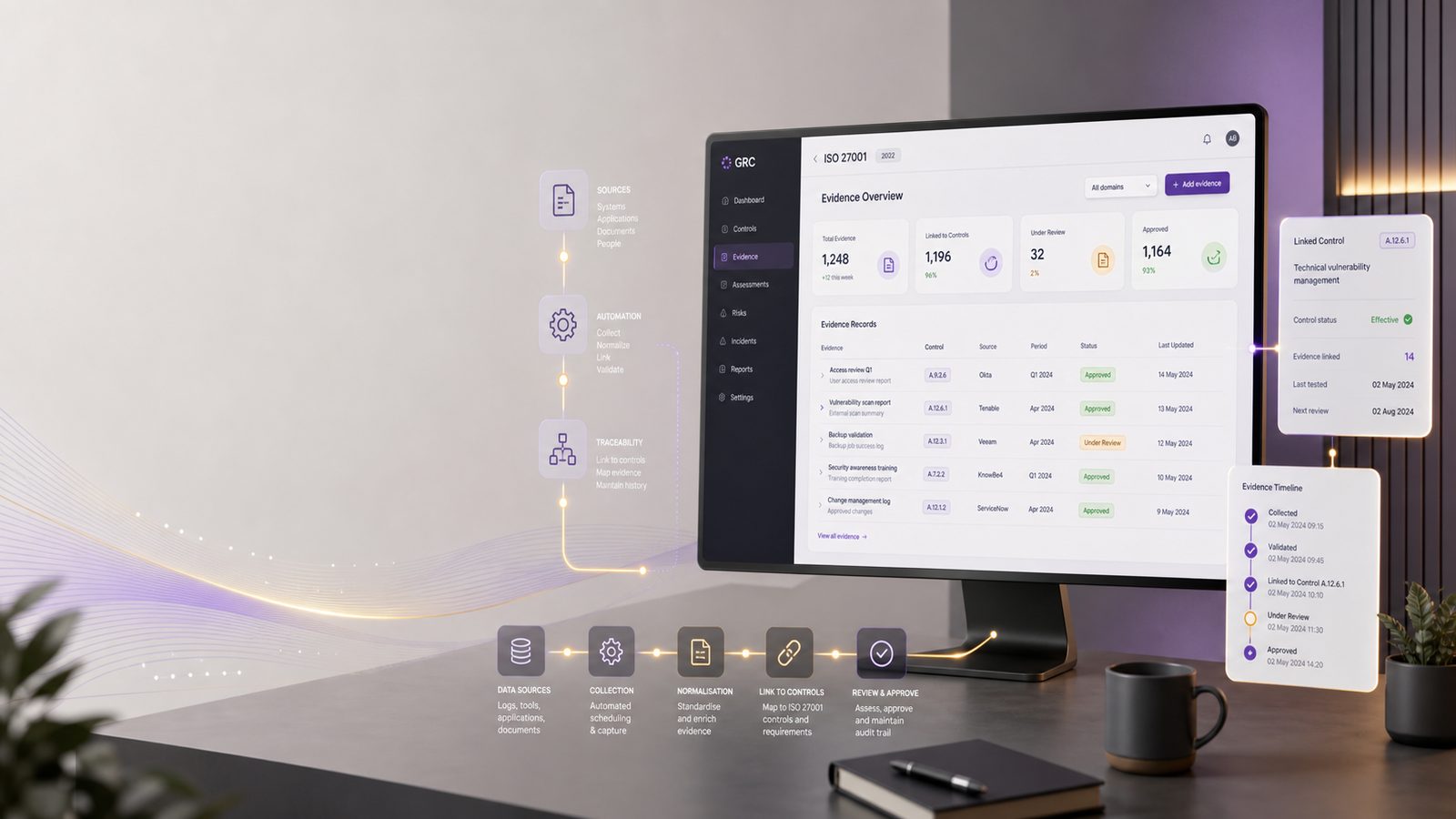
Automating ISO 27001 evidence collection using GRC tools
For many UK SMEs, the hardest part of running an information security management system, or ISMS, is not writing the policy set. It is keeping evidence current, traceable, and easy to retrieve when someone asks for it. That request might come from an internal reviewer, a customer security questionnaire, a supplier assessment, or an external certification body. Whatever the trigger, the same problem appears again and again: evidence lives in too many places, changes too often, and takes too much manual effort to assemble.
Governance, risk, and compliance tools, usually shortened to GRC tools, can help reduce that burden. Used well, they do not replace control ownership or good security practice. Instead, they create a structured way to collect, validate, and link evidence to the controls and risks it supports. For technical teams, that means fewer spreadsheet hunts, better audit trails, and a clearer view of where controls are operating as intended and where they are drifting.
This article focuses on implementation. It assumes you already understand the basics of ISO/IEC 27001 and want to make evidence collection more reliable without building a heavyweight compliance programme.
Why evidence collection becomes a bottleneck in an ISMS
Evidence collection becomes painful when it is treated as a periodic project rather than an operational process. In smaller organisations, the same people often own identity, endpoint management, cloud administration, and security reporting. When evidence requests arrive, they interrupt delivery work and rely on memory, inbox searches, and ad hoc exports.
Typical evidence types SMEs need to track
Most SMEs end up collecting a similar set of artefacts, even if the exact control set differs. Common examples include:
- Access review records from identity platforms such as Microsoft Entra ID, Google Workspace, Okta, or on-premises Active Directory
- Patch compliance reports from endpoint management tools such as Microsoft Intune, Jamf, Tanium, or SCCM
- Backup job success reports and restore test records from backup platforms
- Security event logs or alert summaries from a SIEM, or security information and event management platform
- Vulnerability scan outputs from tools such as Tenable, Qualys, or OpenVAS
- Change approvals and exception records from ticketing systems such as Jira Service Management, ServiceNow, or Freshservice
- Supplier assurance records, contract reviews, and risk acceptances
- Policy approval records, training completion logs, and incident response exercises
Some of these are recurring. Others are one-off or event-driven. The practical challenge is not just storing them, but proving that they are current, attributable, and linked to the relevant control.
Where manual collection breaks down in practice
Manual evidence handling usually fails in predictable ways. Files are exported with inconsistent names. Screenshots are used where structured data would be better. Evidence is copied into shared drives with no clear owner. A control may be marked as complete even though the underlying source system changed weeks ago. By the time someone needs to validate the control, the original context has been lost.
That creates three problems. First, it increases the time spent preparing for reviews. Second, it weakens traceability because nobody can easily show where the evidence came from. Third, it makes it harder to spot control drift, where a control appears to exist but is no longer operating consistently.
What GRC tools should do for ISO 27001 evidence management
A GRC platform should give you a repeatable way to map evidence to controls, risks, owners, and review dates. It should not just act as a document repository. If it does, you have bought a more expensive shared drive.
Core capabilities to look for in a GRC platform
For evidence automation, the most useful capabilities are:
- Control mapping so each evidence item is linked to one or more controls
- Ownership fields so a named person is accountable for review and sign-off
- Evidence expiry or review dates so stale artefacts are surfaced automatically
- API support for pulling data from source systems without manual export
- Webhook or event-driven ingestion for near real-time updates where needed
- Workflow support for review, approval, and exception handling
- Role-based access control, or RBAC, so evidence is visible only to appropriate users
- Audit logs showing who uploaded, changed, approved, or rejected evidence
- Retention controls so evidence is kept for the right period and disposed of consistently
It also helps if the platform supports tags, custom fields, and evidence templates. These features make it easier to standardise how evidence is described across different control families.
How GRC differs from spreadsheets and shared drives
Spreadsheets can work for a very small ISMS, but they do not scale well once evidence starts coming from multiple systems. They are weak on access control, version history, workflow, and automated reminders. Shared drives are better for storage, but they still leave you with manual classification and limited traceability.
A GRC tool adds structure. It can tell you which evidence is missing, which control owner has not reviewed an item, and which artefacts are due for refresh. That operational visibility is often more valuable than the storage itself.
Designing an evidence model before you automate
Before connecting anything, define the evidence model. If you automate first and design later, you usually end up with lots of integrations and no consistent logic.
Define control owners, evidence sources, and review cadence
Start by identifying the control owner for each control or control group. In a small business, this may be the IT manager, head of engineering, operations lead, or finance manager. The important point is that ownership is explicit.
Next, define the source of truth for each evidence item. For example:
- Identity evidence comes from the identity provider, not from a manually edited spreadsheet
- Patch evidence comes from endpoint management, not from screenshots of a dashboard
- Backup evidence comes from the backup platform and restore test records
- Incident evidence comes from the ticketing or case management system
Then set a review cadence. Some evidence should be refreshed monthly, some quarterly, and some only when a relevant event occurs. A good rule is to align cadence to the control risk and the rate of change in the source system.
Separate recurring evidence from one-off artefacts
Recurring evidence is the best candidate for automation. Examples include access reviews, patch status, backup success, and vulnerability scan summaries. One-off artefacts, such as a policy approval or a major incident report, still benefit from structure, but they usually need a workflow rather than a feed.
Keep these categories separate in the GRC model. That makes it easier to apply the right retention, review, and notification rules. It also avoids forcing event-driven evidence into a monthly reporting pattern that does not fit.
Building integrations that reduce manual effort
The most effective automation usually comes from a small number of high-value integrations. You do not need to connect every tool on day one. Focus on the systems that already hold authoritative data and are stable enough to support repeatable extraction.
Pulling evidence from identity, endpoint, cloud, and ticketing systems
Identity systems are often the best starting point because they underpin access control, joiner-mover-leaver processes, and privileged access reviews. A useful integration might pull:
- Active users and disabled accounts
- Privileged role assignments
- Last sign-in dates
- Group membership snapshots
- Access review completion status
Endpoint and cloud platforms can provide patch compliance, encryption status, device health, and configuration baseline data. Ticketing systems can provide evidence of approvals, exceptions, maintenance windows, and incident handling. SIEM platforms can provide alert volume, escalation records, and response timestamps, although these are usually better used as supporting evidence than as the sole proof of control effectiveness.
In practice, the best pattern is often a mix of scheduled pulls and event-based updates. Scheduled pulls work well for monthly or quarterly evidence. Event-based updates are better for approvals, exceptions, and control changes.
Using APIs, webhooks, and scheduled exports safely
APIs are usually the cleanest option because they can return structured data and support incremental updates. Where APIs are limited, scheduled exports can still work if they are controlled carefully. Webhooks are useful when you want near real-time updates, for example when a ticket is approved or a device falls out of compliance.
Whatever method you use, treat the integration as part of the security architecture. Use service accounts with least privilege. Store credentials in a secrets manager rather than in scripts or shared configuration files. Prefer TLS for transport. Log failures, retries, and data validation errors. If the GRC platform supports it, use signed payloads or checksum validation to reduce the risk of tampering or accidental corruption.
For SMEs, a simple pattern is often enough: a scheduled job pulls data from the source system, transforms it into a standard schema, and posts it to the GRC API. The job should write a technical log for troubleshooting and a business-facing status record for the control owner.
Structuring evidence for audit readiness and operational use
Evidence is more useful when it is structured for both humans and systems. A file with a clear name is better than an anonymous export, but metadata is what makes automation work.
Metadata, timestamps, retention, and version control
At minimum, each evidence item should carry:
- Control reference or control group
- Evidence source system
- Owner
- Collection date and time in UTC
- Review date or expiry date
- Environment or scope, if relevant
- Version or snapshot identifier
- Status, such as draft, reviewed, accepted, or exception
Use immutable timestamps where possible. If a report is regenerated, keep the previous version rather than overwriting it. That helps when someone needs to understand whether a control was operating at a specific point in time.
Retention should be aligned to your internal policy and business need. Do not keep evidence forever by default. Equally, do not delete it so quickly that you lose the ability to demonstrate trend or history. A GRC tool should help enforce this through lifecycle rules rather than relying on manual housekeeping.
Linking evidence to risks, controls, and exceptions
Evidence should not sit in isolation. Link it to the relevant control, the risk it supports, and any exception or remediation plan. That way, if a control is temporarily not met, the GRC record shows the compensating action and the expected review date.
This is particularly useful for technical controls that are not binary. For example, patch compliance may be acceptable within a defined service-level window, not only when every device is fully patched at a single point in time. The GRC record should reflect that nuance.
Automation patterns that work well for UK SMEs
UK SMEs usually get the best return from automating a few repetitive controls first. The aim is not to automate everything. It is to remove the most time-consuming manual steps while improving consistency.
Examples for access reviews, patching, backups, and logging
Access reviews can be automated by pulling a monthly snapshot of privileged users, inactive accounts, and high-risk groups into the GRC tool. The control owner then reviews the list, records exceptions, and approves or rejects changes in the workflow.
Patching evidence can be generated from endpoint management reports showing compliance by device group, operating system, and severity band. The GRC tool can flag devices outside the target window and create a follow-up task automatically.
Backups can be tracked through success rates, failed job alerts, and restore test records. A useful pattern is to ingest the daily backup status and then attach the monthly restore test as a separate evidence item. That gives you both operational and assurance evidence.
Logging evidence is often better represented by configuration and monitoring status than by raw log volume. For example, you might record which systems forward logs to the SIEM, which retention period applies, and whether alerting is enabled for critical sources.
Low-friction workflows for small security and IT teams
Small teams need workflows that are quick to operate. A good pattern is:
- Source system exports or API data are ingested automatically
- The GRC tool creates or updates the evidence record
- The control owner receives a review task
- Exceptions are routed to a separate approval path
- Accepted evidence is locked for the review period
Keep the number of approval steps low. If every item needs multiple sign-offs, the workflow will be bypassed. The objective is to make the right action the easiest action.
Detection, validation, and quality checks for automated evidence
Automation only helps if the evidence is trustworthy. A report that is automatically collected but never validated can create false confidence.
How to spot stale, incomplete, or misleading evidence
Build checks for freshness, completeness, and consistency. For example, if an access review report has not changed in three months, that may indicate a broken integration rather than a stable control. If a patch report suddenly shows zero non-compliant devices across all estates, that may be a data issue rather than a genuine improvement.
Useful validation checks include:
- Record counts compared with the previous period
- Schema validation for required fields
- Timestamp checks to confirm the data is current
- Cross-checks between source systems and GRC records
- Alerts when expected evidence is missing
Where possible, compare automated evidence against a small manual sample. That helps confirm the integration is pulling the right data and that the control owner understands what the report means.
Sampling and exception handling for control assurance
Not every control needs full automation. Some are better handled through sampling. For example, you might automate the population list and then manually inspect a sample of records each month. This is often enough to detect obvious issues without creating unnecessary overhead.
Exception handling matters too. If a control cannot be evidenced automatically because a source system is unavailable or a process is still being improved, record the exception explicitly. Include the reason, the compensating control, the owner, and the target date for resolution. That keeps the ISMS honest and avoids silent gaps.
Common implementation pitfalls and how to avoid them
The most common mistake is automating a weak process. If the underlying control is unclear, inconsistent, or poorly owned, automation will simply make the weakness more visible.
Over-automating weak processes
Before building integrations, make sure the control itself is defined clearly enough to be measured. Ask whether the evidence genuinely shows the control is operating, or whether it only shows that a report exists. If the latter, refine the control design first.
Creating evidence sprawl without governance
Another common issue is evidence sprawl. Teams connect multiple systems, create duplicate records, and lose track of which source is authoritative. To avoid this, define a single source of truth for each evidence type and document it in the GRC model. Limit who can create new evidence templates. Review unused integrations regularly and remove anything that no longer adds value.
It also helps to standardise naming conventions. A simple pattern such as control ID, source system, date, and status makes it easier to search and report on evidence later.
A pragmatic rollout plan for the first 90 days
A sensible rollout starts with the controls that are both important and easy to evidence. That usually means identity, patching, backups, and incident tracking. These areas tend to have reliable source systems and clear ownership.
Prioritising high-value controls first
In the first 30 days, define the evidence model, identify control owners, and choose two or three source systems to integrate. In days 31 to 60, build the first automated pulls, validate the data, and run the review workflow with a small group. In days 61 to 90, refine the metadata, add exception handling, and measure how much manual effort has been removed.
Useful measures include:
- Time spent collecting evidence before and after automation
- Number of missing or late evidence items
- Percentage of evidence items with complete metadata
- Number of manual corrections required after ingestion
- Average review turnaround time
These metrics help you judge whether the automation is improving operational discipline, not just reducing admin.
Measuring time saved and evidence quality improvements
Do not measure success only by the number of integrations built. A small number of reliable feeds is usually better than a large number of fragile ones. The real value is in better traceability, less rework, and a clearer picture of control health.
For many UK SMEs, that is the point where GRC tooling starts to feel useful rather than burdensome. It supports the ISMS as an operational system, not just a documentation exercise.
If you are planning to automate evidence collection and want a practical view of what to connect first, it can help to map your current control set, source systems, and review cadence before buying or expanding a platform. That usually produces a cleaner implementation and fewer surprises later.
Speak to a consultant if you would like help shaping an evidence model, selecting integration priorities, or reducing manual effort in an ISO 27001-aligned ISMS.
Comments are closed