
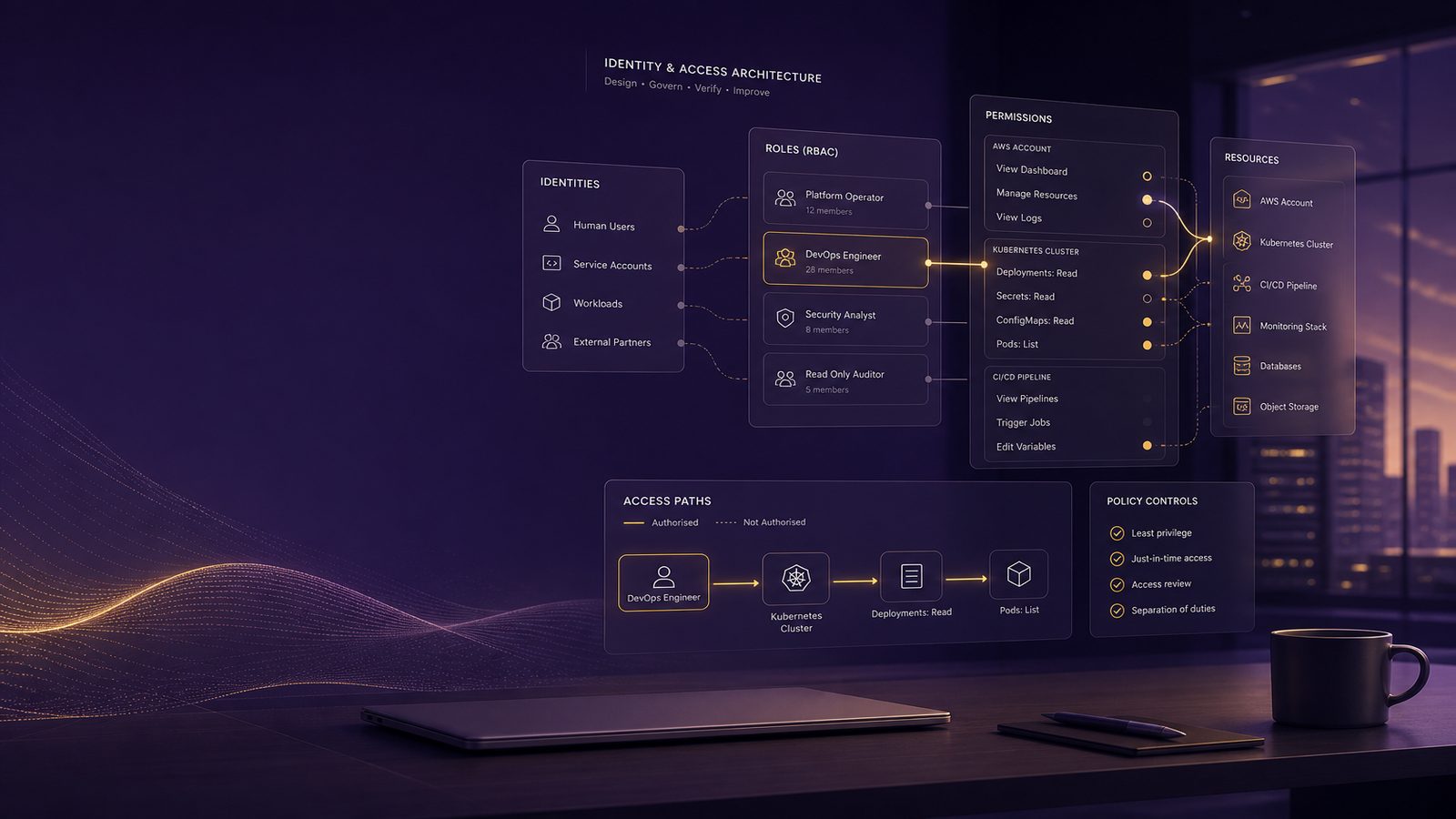
Least privilege is one of those security principles that sounds simple until you try to implement it across cloud platforms, SaaS applications, and internal systems. In practice, it means giving each identity only the access it needs to do its job, and nothing more. For UK SMEs, that is not just a theoretical control. It reduces the blast radius of a compromised account, limits accidental data exposure, and makes it easier to understand who can do what in your environment.
Designing least privilege access using IAM and RBAC is really about turning that principle into a repeatable access model. IAM, or identity and access management, is the control plane for identities, authentication, and permissions. RBAC, or role-based access control, is one way to structure permissions around job functions or system tasks. Used well, they help you avoid one-off exceptions, reduce standing admin rights, and keep access aligned to business need. If you are also thinking about broader architecture patterns, it is worth viewing this alongside Zero Trust network access and microsegmentation design for UK SMEs, because identity controls and network controls reinforce each other.
Key takeaways
- Least privilege works best when IAM is the source of truth and RBAC is used to group permissions around stable job functions.
- Start with a permissions inventory so you can see users, service accounts, workloads, and admin paths before changing access.
- Prefer narrow, explicit allow rules with scoped resources, conditions, and temporary elevation instead of standing admin rights.
- Test role changes with policy analysis, access logs, and denied-action review before rolling them into production.
- Monitor privilege changes and unusual role use in your SIEM so you can spot misuse early.
Why least privilege matters in cloud and application access
Over-permissioned identities are a common cause of avoidable security exposure. A user with broad access may not intend to misuse it, but if their account is phished, token theft occurs, or a service principal is abused, the attacker inherits those permissions. The same is true for automation identities, API keys, and workload roles. The larger the permission set, the larger the potential impact of compromise.
How over-permissioned identities increase blast radius
In a cloud environment, a single identity can often reach storage accounts, message queues, databases, CI/CD systems, or directory objects. If that identity has broad write or administrative permissions, an incident can move from a single account compromise to data theft, configuration tampering, or service disruption. Least privilege reduces that blast radius by narrowing the set of actions available to each identity.
Where IAM and RBAC fit in a modern security architecture
IAM is the foundation for authentication and authorisation. RBAC is one of the main design patterns used to make authorisation manageable at scale. In a modern architecture, IAM usually handles identity lifecycle, conditional access, MFA, and session controls, while RBAC structures permissions into roles that can be assigned to users, groups, service accounts, or managed identities. If you are shaping the wider security model, this also sits naturally within a risk-led approach such as SABSA framework for risk-driven security architecture.
IAM and RBAC: the practical distinction
People often use IAM and RBAC interchangeably, but they solve different problems. IAM is the system that proves identity and applies access decisions. RBAC is a way of organising permissions so that access can be granted consistently based on role membership rather than individual exceptions.
Identity and access management in cloud platforms and SaaS
In cloud platforms and SaaS, IAM usually includes users, groups, service principals, managed identities, conditional access, MFA, and audit logging. It may also include federation with a central identity provider such as Entra ID or another SSO platform. The important point is that IAM should be the source of truth for identity and access decisions, rather than local accounts scattered across applications.
Role-based access control as a way to group permissions
RBAC works best when roles represent stable business functions or technical tasks. For example, a finance analyst role should allow invoice processing and reporting, but not tenant-wide administration. A platform operator role may allow deployment and monitoring, but not security policy changes. RBAC is not just about convenience. It is about making access reviewable, auditable, and easier to change without creating bespoke permissions for every person.
Start with a permissions inventory
You cannot design least privilege if you do not know what access already exists. Start by inventorying identities, permissions, and the systems they touch. This is the point where many teams discover that access has grown organically through project work, temporary fixes, and inherited admin groups.
Identify users, service accounts, workloads, and admin paths
Separate identities into categories. Human users need interactive access. Service accounts and workload identities need non-interactive access for automation, integrations, and background jobs. Administrative paths need special attention because they often bypass normal controls. Include direct console access, API access, break-glass accounts, delegated admin roles, and any local application accounts that sit outside central IAM.
For cloud platforms, export role assignments, group memberships, and policy attachments. In AWS, that may mean reviewing IAM users, roles, policies, and permission boundaries. In Azure and Entra ID, it may mean reviewing role assignments, PIM eligibility, app registrations, enterprise applications, and conditional access. In SaaS, review built-in admin roles, custom roles, and any SCIM-provisioned groups. The goal is to build a clear picture of who can do what, where, and through which path.
Map actions, resources, and business owners before changing access
Access design works better when you map permissions to actions and resources, then confirm the business owner for each system. A useful structure is: identity, action, resource, environment, and approval owner. For example, a support engineer may need read access to customer tickets in production, but not export rights or delete rights. A developer may need write access in non-production, but only read access in production logs. This mapping also helps you identify where a role is too broad for the actual task.
Design roles around job functions and system tasks
Good RBAC design is usually boring in the best possible way. Roles should be predictable, reusable, and easy to explain. If a role needs a long exception list, it is probably doing too much.
Separate human access from workload access
Human access and workload access should not be mixed into the same role. A person who administers a system may need interactive access, MFA, and approval workflows. A workload that reads from a queue or writes to storage should use a managed identity, service principal, or equivalent non-human credential with tightly scoped permissions. Mixing those patterns makes reviews harder and increases the chance of standing privilege being reused in the wrong context.
For example, a deployment pipeline should not use a human admin account. It should use a dedicated automation identity with only the permissions needed to deploy to a specific subscription, project, or environment. If the pipeline needs to read secrets, it should have access only to the specific secret store and only to the required secret operations.
Avoid role sprawl by using reusable permission bundles
Role sprawl happens when every team, project, or manager asks for a slightly different role. Over time, you end up with dozens of near-duplicate roles that are difficult to govern. A better pattern is to define a small number of reusable roles based on common tasks, then use group membership, conditions, or scoped assignments to tailor access. That keeps the role catalogue manageable and makes access reviews more meaningful.
Where possible, use naming conventions that show scope and intent, such as app-reader-prod, app-deployer-nonprod, or storage-writer-backup. The naming itself does not enforce security, but it makes reviews and incident response much easier.
Build policies with explicit allow and narrow scope
Least privilege is easiest to maintain when permissions are explicit. Broad wildcard permissions, inherited admin rights, and catch-all policies are the usual sources of drift. The design target should be narrow allow rules, scoped to specific resources and conditions.
Use resource scoping, conditions, and environment boundaries
Scope permissions to the smallest practical unit. That may be a subscription, resource group, project, bucket, database, or application tenant. Add conditions where the platform supports them, such as source IP, device compliance, MFA status, time of day, or approved network location. Separate production from non-production with hard boundaries, not just naming conventions. If a role is intended for test systems, it should not automatically work in production.
In cloud policy languages, this often means using explicit resource ARNs, subscription scopes, or object prefixes rather than wildcard access. In Entra ID and similar platforms, it may mean combining role assignment with conditional access and privileged identity management. For application-level authorisation, use claims or attributes that reflect role, tenant, region, or data classification, rather than relying on a single all-purpose admin flag.
Prefer deny guardrails for high-risk actions where supported
Some platforms support explicit deny controls, permission boundaries, or guardrails that prevent dangerous actions even if a role is misconfigured later. These are particularly useful for high-risk operations such as deleting logs, disabling audit trails, changing security policies, or altering key management settings. Deny controls should be used carefully, but they are valuable as a backstop when you want to protect critical assets from accidental or malicious changes.
Apply least privilege across common cloud patterns
Least privilege looks different depending on how the identity is used. A console user, API client, and cross-account role all need different controls. The design challenge is to keep the model consistent without forcing every use case into the same pattern.
Console users, API access, and automation identities
Console users should authenticate interactively, use MFA, and receive only the permissions needed for their job. API clients and automation identities should use short-lived credentials where possible, with scoped tokens and limited session duration. Avoid long-lived access keys unless there is no viable alternative, and if they must exist, rotate them and monitor their use closely.
For developers and operators, separate read-only access from change access. Many incidents are made worse because a troubleshooting role can also modify production settings. A better pattern is to give read access broadly enough to diagnose issues, then require elevation for changes. That keeps day-to-day work efficient while preserving control over risky actions.
Cross-account access, break-glass access, and temporary elevation
Cross-account access should be tightly scoped and documented. Use dedicated roles for specific trust relationships rather than reusing generic admin roles across environments. Break-glass accounts should exist for emergency access, but they should be heavily protected, excluded from normal sign-in paths where appropriate, and monitored closely. They are not a substitute for good access design.
Temporary elevation is usually better than permanent privilege. If your platform supports just-in-time access or privileged access workflows, use them for admin tasks. A user can be made eligible for a role, then activate it for a limited period with approval, MFA, and logging. This reduces standing privilege and gives you a clearer audit trail. If you are already using Entra ID for identity governance, this fits well with a broader Zero Trust architectures with Entra ID approach.
Use cloud-native controls to reduce standing privilege
Standing privilege is one of the most common weaknesses in access design. The aim is to make high privilege temporary, reviewable, and tied to a specific purpose.
Just-in-time access and privileged access workflows
Just-in-time access means privilege is granted only when needed and only for a limited time. Privileged access workflows can require approval, ticket reference, or justification before activation. This is especially useful for administrator roles, security policy changes, and production support. The operational benefit is that you can keep the number of permanently privileged identities low without slowing the business down.
Permission boundaries, session duration limits, and approval gates
Permission boundaries limit what a role can ever do, even if additional policies are attached later. Session duration limits reduce the window in which a stolen token or active session can be abused. Approval gates add a human decision point for sensitive actions. Used together, these controls create a layered access model that is much harder to abuse than static admin membership alone.
Test whether access is actually least privilege
Designing least privilege is only half the job. You also need to test whether the model works in practice. The most useful test is not whether users can still do everything they want, but whether they can still do everything they need.
Review denied actions, unused permissions, and access logs
Denied actions are useful signals. If a user or workload repeatedly hits access denied events, that may indicate a missing permission or a poorly designed role. If a permission has not been used for months, it may be unnecessary. Access logs should show who attempted what, from where, and whether the action succeeded. This gives you evidence for tuning roles and spotting overreach.
For cloud platforms, review IAM access advisor data, role usage reports, sign-in logs, and audit trails. For SaaS, review admin activity logs and group membership changes. For applications, review authorisation failures and privilege-related events. The aim is to identify both under-permissioned workflows and over-permissioned identities.
Use simulation and policy analysis tools before rollout
Before you tighten access in production, simulate the effect of policy changes. Many cloud platforms provide policy simulators, effective permission views, or access analysis tools. Use them to understand the net result of multiple policies, group memberships, and inherited permissions. This is particularly important where a role is used by more than one team or where a service identity has dependencies that are not obvious from the policy document alone.
For more on structured validation of controls, the approach used in secure design reviews and architecture checkpoints in the SDLC is a useful complement, because access control changes should be treated as design changes, not just configuration tweaks.
Detect and respond to privilege misuse
Least privilege reduces risk, but it does not remove the need for monitoring. You still want to know when privilege is used unexpectedly, escalated unusually, or changed outside normal process.
Alert on privilege escalation, policy changes, and anomalous role use
High-value alerts include new admin assignments, changes to conditional access, creation of new service principals, policy attachments with broad scope, and activation of privileged roles outside normal hours. Also watch for unusual role use, such as a helpdesk account suddenly accessing production data or an automation identity being used interactively.
These events should feed your SIEM so they can be correlated with sign-in risk, endpoint telemetry, and workload logs. If an identity is compromised, the question is not only whether it logged in, but whether it used access in a way that matches its normal pattern.
Correlate IAM events with endpoint and workload telemetry
Identity events become more useful when correlated with endpoint and workload data. A role activation followed by a suspicious PowerShell session, an unusual API call, or an unexpected data export is much more actionable than any single event on its own. Correlation also helps distinguish legitimate admin activity from abuse. That is especially important in smaller teams where the same engineer may legitimately perform support, deployment, and incident response tasks.
Common design mistakes to avoid
There are a few recurring mistakes that undermine least privilege even when the right tools are in place.
Using broad managed policies as a shortcut
Broad managed policies are convenient, but they often grant far more than the task requires. They are tempting during implementation because they reduce friction, yet they create long-term risk and make reviews harder. If you must start broad to keep a project moving, treat it as temporary and schedule a follow-up to narrow the scope.
Treating RBAC groups as permanent admin access
Another common mistake is to use RBAC groups as a permanent home for admin rights. That creates standing privilege and makes it hard to tell whether access is still justified. A better pattern is to make admin roles eligible, time-bound, and reviewable. If a group is effectively an admin club, it is not least privilege.
A practical rollout approach for UK SMEs
For most UK SMEs, the right approach is incremental. You do not need to redesign every role in one go. Start with the identities and systems that would cause the most damage if misused, then expand from there.
Prioritise high-risk systems and privileged identities first
Begin with production admin roles, finance systems, identity platforms, backup systems, and any automation identities that can reach sensitive data. These are usually the highest-value targets and the most likely to create operational disruption if abused. Tightening these first gives you the biggest reduction in risk for the least amount of change.
Iterate with owners, exceptions, and periodic access reviews
Work with system owners to validate what access is genuinely required. Expect some exceptions, but make them explicit, time-limited, and reviewed. Then set a cadence for access reviews so roles do not drift back into broad access over time. If you already have an ISMS, this fits naturally into your control review and evidence collection process, similar in spirit to automating ISO 27001 evidence collection using GRC tools, although the access design itself should remain operationally practical rather than paperwork-heavy.
As a rule of thumb, if a role has not been reviewed in the last quarter, if it is shared across unrelated functions, or if it has grown through repeated exceptions, it probably needs attention.
Designing least privilege access using IAM and RBAC is not about perfection. It is about making access decisions deliberate, narrow, and reviewable. If you get the role model, scoping, elevation, and monitoring right, you will reduce both security exposure and operational confusion. For UK SMEs, that is usually a worthwhile trade-off.
If you want help reviewing your current identity model, role structure, or privileged access workflows, Speak to a consultant.
Frequently asked questions
What is the principle of least privilege in IAM?
It is the practice of giving each identity only the permissions it needs to perform its approved tasks, with no unnecessary access to other systems, data, or administrative functions.
How do IAM policies and RBAC work together?
IAM provides the identity, authentication, and policy enforcement layer, while RBAC organises permissions into roles that can be assigned consistently to users, groups, or workloads.
How do you design RBAC roles without creating excessive access?
Define roles around stable job functions or system tasks, keep the number of roles small, scope them to specific resources or environments, and review them regularly for overlap or drift.
Comments are closed