
Credential attack simulation using BloodHound: a practical guide for technical practitioners
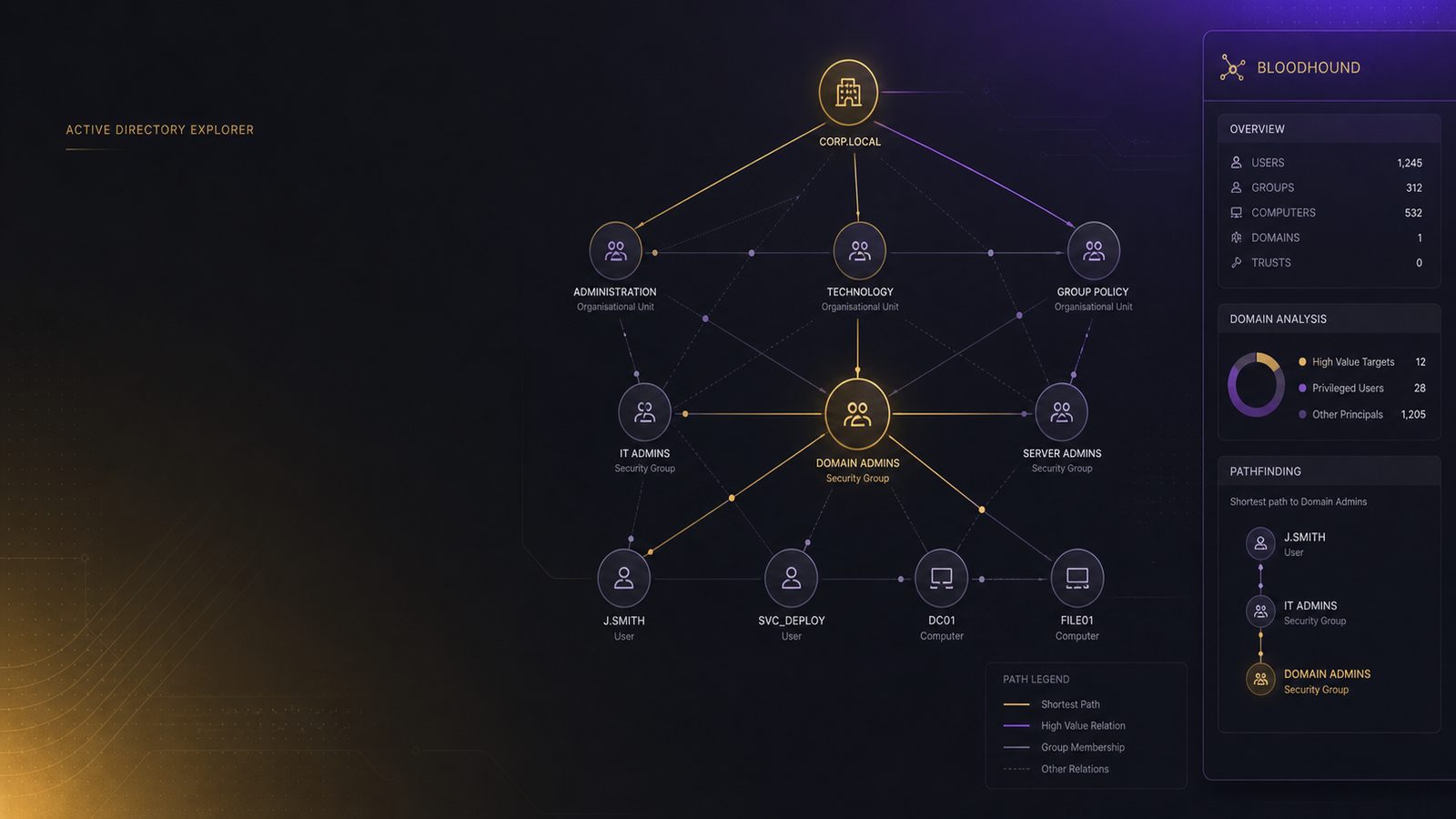
Credential attack simulation using BloodHound is a useful way to understand how identity relationships, privilege assignments, and session exposure can combine into realistic attack paths. For many UK SMEs, the issue is not a single critical vulnerability. It is the accumulation of small identity weaknesses across Active Directory, local administrator rights, delegation settings, and stale group membership. BloodHound helps you model those relationships as a graph so you can see how an attacker who gains one foothold might move laterally or escalate privileges.
That makes BloodHound valuable in a controlled red team or purple team exercise, but it is not a standalone penetration testing method. It does not replace endpoint testing, web application testing, or manual validation. Instead, it gives you a structured way to answer a practical question: if an attacker obtained one compromised account, what would be the most likely route to more sensitive systems or higher privilege?
What BloodHound is used for in credential attack simulation
BloodHound is best understood as an attack-path analysis tool for Active Directory and related identity infrastructure. It ingests directory data and maps relationships such as group membership, local administrator rights, session presence, delegation, and control over objects. The result is a graph that can reveal privilege chains that are difficult to spot in spreadsheets or standard admin consoles.
In a credential attack simulation, the aim is not to prove that an attacker can break in from the internet. The aim is to model what happens after an initial identity compromise. That could be a phishing-led account compromise, a password reuse issue, a token theft scenario, or a compromised service account. BloodHound helps you test whether that initial access can be turned into broader access through existing trust relationships.
Traditional vulnerability scanning looks for missing patches, exposed services, weak TLS settings, or known software flaws. BloodHound looks at the identity layer. It answers different questions:
- Which users can administer which systems?
- Which privileged sessions are present on lower-trust hosts?
- Which groups or delegated rights create escalation paths?
- How many hops separate a standard user from a high-value asset?
That distinction matters because many real-world compromises succeed through identity abuse rather than software exploitation. If your environment has strong perimeter controls but weak privilege hygiene, the attack path may still be short.
Defining scope, permissions, and safety boundaries
Before collecting any data, define the scope carefully. BloodHound collection is read-heavy, but it still touches directory services and endpoint telemetry. In a small business environment, the safest approach is to start with a limited test domain, a representative business unit, or a controlled subset of servers and workstations.
Choose a scope that gives you meaningful results without disrupting production. A sensible starting point is:
- One Active Directory domain or a clearly bounded OU structure
- A small set of privileged and standard user accounts for simulation
- Selected servers that are representative of your crown jewels
- Known administrative workstations, jump hosts, and file servers
Set rules of engagement before you begin. Even for internal testing, document what is in scope, what is out of scope, and what actions are prohibited. For example, decide whether you will only collect directory data or whether you will also validate selected paths manually. Make it explicit that the exercise must not disrupt authentication, lock out accounts, or interfere with business-critical services.
Logging and change control matter here. If you are running SharpHound or a similar collector, coordinate with operations teams so they know when collection is taking place. Ensure your SIEM or log platform can distinguish the exercise from suspicious activity. That reduces the risk of false incident escalation and gives you a cleaner record of what was tested.
For UK SMEs, this is also where governance becomes important. If you are aligning security work to an ISO 27001-style ISMS, treat the exercise as a controlled security test with defined objectives, evidence, and remediation tracking. You do not need to over-formalise it, but you do need enough structure to make the results repeatable and useful.
Preparing the environment and collecting directory data
BloodHound typically relies on SharpHound for data collection in Windows environments. SharpHound gathers information from Active Directory, local group membership, session data, ACLs, trusts, and other relevant relationships. In practice, the quality of your analysis depends heavily on the quality and completeness of the collection phase.
A common pattern is to run collection from a controlled admin workstation or a dedicated test host with the right permissions for the scope you have agreed. The exact collection mode depends on what you are trying to learn. For example, you may want to focus on sessions and local admin relationships first, then expand into ACL and delegation analysis later. The key is to avoid collecting everything blindly if your environment is large or sensitive.
Useful collection considerations include:
- Use a dedicated test account rather than a privileged production account unless the exercise specifically requires elevated visibility
- Time collection to avoid peak business hours where possible
- Capture enough data to support path analysis, but not so much that you create noise or unnecessary operational load
- Store exports securely, because the data itself can reveal sensitive identity relationships
Data quality is often the limiting factor. If sessions are missing, local admin relationships are incomplete, or certain OUs are excluded, BloodHound may understate the real attack surface. That can create false confidence. Validate coverage by comparing the collected data with known administrative structures, a sample of endpoint configurations, and directory reports from your identity team.
Common blind spots include stale computer objects, disabled but not removed accounts, incomplete session visibility, and service accounts that are not well documented. In hybrid environments, be careful not to assume that on-premises data tells the whole story. Cloud identity relationships, synchronisation rules, and privileged access workflows may create additional paths that are not obvious in the on-prem graph.
Analysing credential exposure and privilege paths
Once the data is loaded, the real value comes from asking targeted questions. BloodHound is most useful when you are looking for specific classes of exposure rather than browsing the graph at random.
Start with the most common escalation and lateral movement relationships:
- Local administrator rights across workstations and servers
- Active sessions of privileged users on lower-trust systems
- Nested group membership that grants broader access than intended
- Delegation settings that allow impersonation or service abuse
- ACLs that permit users or groups to modify privileged objects
For credential attack simulation, the most important question is often not whether a path exists, but how short and practical it is. A path from a standard user to a domain admin equivalent through a handful of misconfigurations is materially more concerning than a theoretical path that requires unusual conditions. Prioritise paths that involve real accounts, active sessions, and systems that are routinely used by administrators.
BloodHound can also help you identify where privilege boundaries are weak. For example, if helpdesk staff have local administrator rights on too many endpoints, or if server administrators log onto user workstations, you may have created a path that allows credential theft or token reuse. Similarly, if service accounts have broad rights and weak segmentation, they can become stepping stones into sensitive systems.
When you review paths, think in terms of business impact. A route to domain admin is not just a technical finding. It may imply the ability to disable security tooling, access sensitive files, tamper with backups, or disrupt operations. A route to a finance system, HR platform, or engineering repository may be equally important depending on the business.
It is also worth mapping findings to MITRE ATT&CK. BloodHound findings often align with techniques such as valid accounts, remote services, lateral tool transfer, and privilege escalation through group membership or delegated rights. That mapping helps you translate graph results into detection and response work, rather than leaving them as a one-off assessment artefact.
Turning findings into defensive detections and hardening actions
The value of BloodHound increases when the findings drive concrete hardening work. The goal is not to eliminate every path, which is rarely realistic. The goal is to reduce the number, length, and reliability of paths that an attacker could use.
Start with privilege hygiene. Review who has local administrator rights, where those rights are inherited from, and whether they are still needed. Remove standing privilege where possible and replace it with just-in-time or time-bound elevation. Where that is not practical, at least separate admin and standard user accounts and restrict where privileged accounts can log on.
Tiering is another effective control. Keep high-value administrative accounts away from lower-trust endpoints. If administrators routinely use the same workstation for email, browsing, and privileged administration, you are increasing the chance that a compromised endpoint becomes a route to higher privilege. A tiered model, even a lightweight one, can significantly reduce exposure.
Delegation review is often overlooked. Kerberos delegation, constrained delegation, and related service configurations can create powerful abuse paths if they are too broad. Review these settings carefully and remove legacy configurations that no longer have a clear business need.
Group structure also matters. Flatten overly nested groups where possible. Make privileged groups explicit and easy to audit. If a user needs access through multiple inherited memberships, document why that is the case and whether there is a simpler alternative.
From a detection perspective, use BloodHound findings to inform SIEM and EDR use cases. If the graph shows that privileged sessions are present on user workstations, create detections for unusual logon patterns, remote admin tool usage, and privilege-bearing sessions on non-admin hosts. If local admin rights are widespread, monitor for suspicious service creation, remote execution, and credential dumping indicators on those endpoints. The exact telemetry will depend on your stack, but the principle is the same: turn the path analysis into observable behaviours.
Operationalising the exercise in a small security team
Small teams often struggle not with analysis, but with follow-through. To make BloodHound useful over time, treat it as part of a repeatable workflow rather than a one-off exercise.
A practical operating model looks like this:
- Run a baseline collection on a scheduled cadence, such as quarterly or after major identity changes
- Track the highest-risk paths in a simple register with owner, remediation action, and target date
- Re-run collection after major changes such as mergers, new admin models, or directory restructuring
- Use the results in purple team sessions to validate whether detections fire as expected
If you already have a SIEM, feed the exercise findings into your detection backlog. If you have EDR, check whether the telemetry you need is actually enabled on the systems that matter. If you have an identity governance tool, use the findings to prioritise access reviews and privileged role cleanup.
For UK SMEs, this is where the exercise becomes commercially valuable. You are not just identifying technical weaknesses. You are reducing the likelihood that one compromised account can become a wider incident. That can support resilience, reduce recovery effort, and improve confidence in your identity controls.
Common pitfalls and limitations to account for
BloodHound is powerful, but it has limitations. The biggest mistake is to treat the graph as ground truth without validation. Directory data can be stale, incomplete, or misleading if your collection scope is narrow. A path that appears valid may no longer be exploitable in practice, while a real path may be invisible if the relevant data was not collected.
Another common issue is over-trusting the shortest path. The shortest path is not always the most likely path. Attackers often prefer routes that are operationally quiet, familiar, or less likely to trigger alerts. That means you should consider both path length and path realism.
BloodHound also does not replace manual verification. If a path depends on a specific local admin relationship, delegation setting, or session condition, validate it carefully in a controlled way. The point is to understand exposure, not to create unnecessary risk in production.
Finally, combine BloodHound with other testing methods. Pair it with endpoint review, identity monitoring, configuration assessment, and, where appropriate, safe manual validation. A good credential attack simulation programme looks at the identity graph, the endpoint layer, and the detection layer together.
Used well, BloodHound gives technical teams a clear view of how identity relationships shape real attack paths. For UK SMEs, that can make privilege reduction, segmentation, and detection tuning much more focused. If you want help turning BloodHound findings into a practical hardening plan, a consultant can help you structure the exercise, interpret the results, and prioritise remediation in a way that fits your environment.
Frequently asked questions
What is the difference between BloodHound analysis and a traditional vulnerability scan?
BloodHound analysis focuses on identity relationships and privilege paths in Active Directory, such as group membership, local admin rights, sessions, and delegation. A traditional vulnerability scan focuses on software flaws, missing patches, exposed services, and configuration weaknesses. They are complementary, not interchangeable.
How often should a small team repeat credential attack path analysis?
Quarterly is a sensible baseline for many SMEs, with additional runs after major identity changes, mergers, admin model changes, or significant onboarding of new systems. The right cadence depends on how quickly your directory and privilege model changes.
Conclusion
Credential attack simulation using BloodHound is most effective when it is treated as a structured identity risk exercise. Define a safe scope, collect good data, focus on the paths that matter, and turn the findings into hardening and detection work. That approach gives technical teams a practical way to reduce the chance that one compromised account becomes a broader incident.
If you are looking to align the exercise with wider governance or to build a repeatable improvement cycle, it can help to bring in external support for planning, analysis, and remediation prioritisation.
Comments are closed